About Unlock and S-ON
About ***UNLOCKED*** vs ***LOCKED***
(and why S-ON is ok for installing custom roms)
The HTCdev tool for unlocking the bootloader allows developers to flash their own custom built roms. The status in the bootloader startup screen is displayed as ***UNLOCKED*** after the device bootloader has been successfully unlocked using the HTCdev tool. This is not to be confused with unlocking the SIM card nor with the S-ON/S-OFF (Security-ON/Security-OFF) status also shown in the bootloader startup screen.
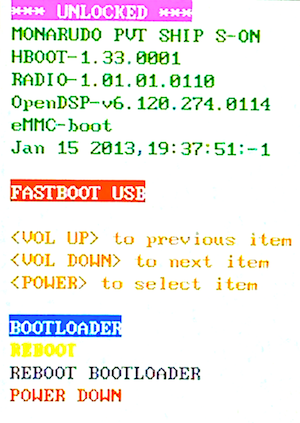
What is meant by unlocking the bootloader is that certain partitions are unlocked to provide write access. Specifically: boot, system and recovery. There are many more partitions (e.g. the radio) but only these are the minimal necessary to overwrite a default stock rom with a custom built Android based rom.
Please reference the flashing guide for more information on how to flash custom roms.
You do not need to turn security off to accomplish the basic installation of a custom rom which even includes providing root access and remounting your system to be writable. Note: you shouldn’t really need to keep the system files writable across reboots as this is primarily useful only while developing.
Security is on by default for good reasons. There are partitions such as hboot which controls access to all other partitions which if made fully accessible could compromise security and very possibly allow for irreversible changes that could render your device inoperable. For warranty and device support purposes alone it would be to your benefit to keep Security-ON. Another partition that is secured is the radio. It is not advisable to alter or customize the radio and most custom roms will not need to. The radios are fine tuned to the specific carrier(s) they are designed to support and with the specifications as prescribed by law. Moreover altering them may not only also cause irreparable damage to your device but it could very well interfere with the normal communications possibly affecting other devices.
There are those who will insist on disabling S-ON purely to have full access regardless of security implications or to primarily promote specific tools and installation techniques that have taken the more convenient route of assuming all security is off. If a command line tool is deemed as inconvenient, developers can easily develop alternatives that would allow others to install their custom roms without having to alter their device’s Security-ON status. As duly noted in the accompanying email with your unlock_code.bin, please remember that unlocking your bootloader may void all or parts of your warranty and your device may not function as intended by HTC. Unlocking the bootloader is for development purposes only.
