Pages

C3 Health Services

Visit Official Website 9278982994

Expert Healthcare at Your Doorstep

Friday, 29 August 2014

Difference between Owner and Parent in Delphi

Difference between Owner and Parent in Delphi

Parent is the Window control where the control is displayed. Owner is the component responsible for making sure it's destroyed. Parent refers to the component that another component is contained in, such as TForm, TGroupBox or a TPanel. If one control (parent) contains others, the contained controls are child controls of the parent.

Example of Owner and Parent

Whenever we try add a button on a panel in a form, we try to make an invisible connection between the components. When a component is dropped on a form at design time, the owner is the form and the parent is the container on which it is dropped.

As we add the button on the panel, the panel automatically is set as the parent of the button while the form becomes the owner.  

Another example, drop a group box on a form. Its owner and parent are both the form. Drop a check box on the group box. Its owner is the form and its parent is the group box.

Parent is required to make a control visible

For a component to be visible, it must have a parent to display itself within. Controls that appear on the screen need to know where to paint themselves, hence the parent property. It specifies the visual container for the control. This property must be specified before a control can be displayed. When you want to create a TButton at run-time, it is important that we remember to assign a parent - the control that contains the button. 

The Parent component on the other end determines how the child (i.e. contained component is to be displayed). All the properties like left, top etc are relative to the parent component.

Owner is Readonly while Parent can be changed

Owner property is a read only property and cannot be modified, however parent for a control can be assigned and chagned easily at runtime. The Owner is being set while invoking the create constructor and becomes a read-only property so can't be changed later on.

Allocating and Freeing the memory

The Owner component is responsible for freeing the allocated memory of the owned components. Form is the owner of all the components residing inside it. So whenever the form is destroyed, all the components memory is freed automatically. This is the purpose of ownership.

HasParent Property

Not all components have the Parent. Many forms do not have a Parent. For example, forms that appear directly on the Windows desktop have Parent set to nil. A component's HasParent method returns a boolean value indicating whether or not the component has been assigned a parent.

Parent Property

We use the Parent property to get or set the parent of a control. If we try to create a new control, then we need to set the parent property of the control to make it visible. For example, 

Button1.Parent := Panel1;

Above code has set Panel1 as the parent of Button1.

Difference between Components and Controls in Delphi

Difference between Components and Controls in Delphi

Controls are the visible elements on the Delphi Forms to which you can focus and interact. All the controls are components and vice versa is not true. So we can say that Controls are the subset of Components in Delphi.

TComponent is the common ancestor of all component objects in Delphi. TControl is the abstract base class for all visual components. Everything that goes into the component palette is a Component. Everything that goes into the component and is something that the user of the program can control by using mouse or keyboard is a Control.

For example: TTimer component is a component that you can place on a form, but it is not visible to the end-user. So TTimer is only the component but not a control in Delphi. Other examples like TTimer are TXMLDocument, TDatabase, TQuery, TTable, TDataSet, TDataSource etc. These all components play a vital role but never appear in front of the end user.

A TEdit or TButton is visible and can be controlled by the user (you can add events to TEdit and TButton and with those events a user can actually focus/select/click on the TEdit and TButton components). So both TEdit and TButton are the components as well as controls in Delphi. 

A control takes up more resources than a component because a control needs extra info about how to draw itself.

Thursday, 21 August 2014

How to create and extract ZIP files in Delphi XE6?

How to create and extract ZIP files in Delphi XE6?

Delphi provides System.Zip unit for creating ZIP files. System.Zip unit contains a simple ZIP extractor and creator class named TZIPFile. TZIPFile class mainly has three methods which are used to create and extract zip files:

ZipDirectoryContents: Creates the zipped file
IsValid: Validates the zip file
ExtractZipFile: Extracts the zip file

Following is the code snippet in Delphi to create a zip file.

uses System.Zip;

TZIPFile.ZipDirectoryContents('C:\FolderToZip', 'C:\ZippedFolder.zip');

Following is the code snippet in Delphi to extract a zip files. 

uses System.Zip;

ZipFile := 'ZippedFolder.zip'; //This is my zip file
if TZipFile.IsValid(ZipFile) then //Validate zip file
begin
  TZipFile.ExtractZipFile(ZipFile, 'C:\DestinationDirectory'); //Extract the zip file
end
else
begin
  ShowMessage('Zip File is not valid');
end;

Friday, 1 August 2014

How to create XML document in Delphi XE4 using IXMLDOCUMENT and IXMLNODE?

How to create XML document in Delphi XE4 using IXMLDOCUMENT and IXMLNODE?

Following is the self explanatory code in Delphi XE4 to create XML document using IXMLDOCUMENT and IXMLNODE interfaces. You should have XMLIntf and XmlDoc units in your uses section. Following CreateXMLinDelphi Delphi procedure creates an XML named MyXML in D drive.

procedure CreateXMLinDelphi;
var
  XML : IXMLDOCUMENT;
  RootNode, CurNode : IXMLNODE;
begin
  XML := NewXMLDocument;
  XML.Encoding := 'UTF-8';
  XML.Options := [doNodeAutoIndent];
  RootNode := XML.AddChild('ParentNode');
  CurNode := RootNode.AddChild('ChildNode1');
  CurNode.Text := 'ChildNode Text 1';
  CurNode := RootNode.AddChild('ChildNode2');
  CurNode.Text := 'ChildNode Text 2';
  XML.SaveToFile('D:\MyXML.xml');
  ShowMessage('XML created successfully');
end;

The above code generates following XML document:

<?xml version="1.0" encoding="UTF-8"?>
<ParentNode>
  <ChildNode1>ChildNode Text 1</ChildNode1>
  <ChildNode2>ChildNode Text 2</ChildNode2>
</ParentNode>

How to create an XTR file from XML in Delphi XE4 using XML Mapper?

How to create an XTR file from XML in Delphi XE4 using XML Mapper?


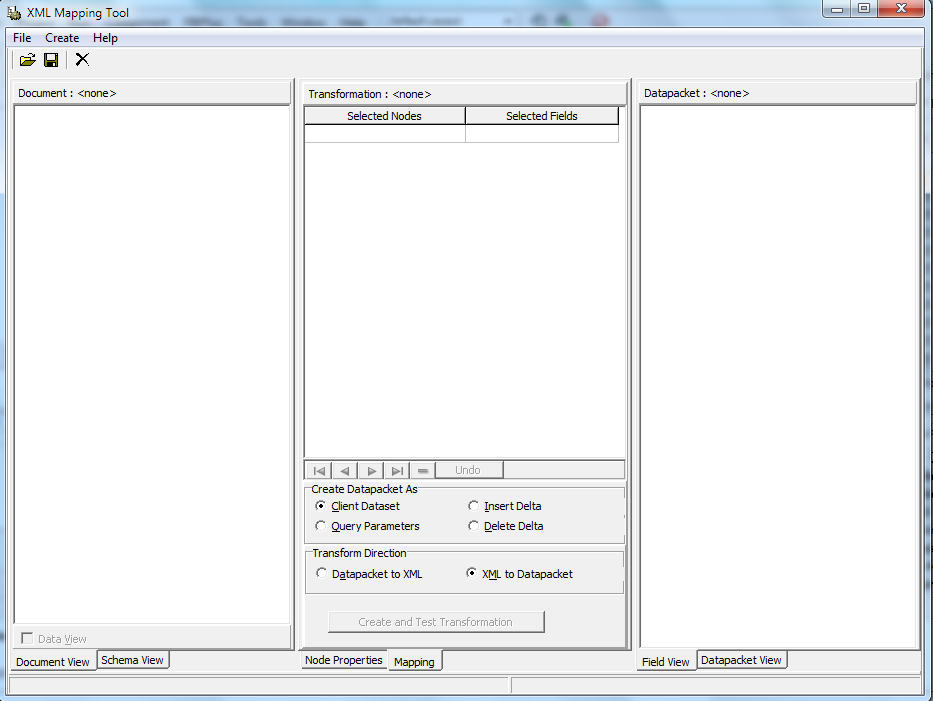
By using Delphi XE4 RAD Studio, you can create an XTR file from the given XML file using XML Mapper. XML Mapper Tool is provided in RAD Studio XE4 under Tools -> XML Mapper.

Following are the steps to create an XTR file from XML in Delphi XE4 using XML Mapper:

1. Open the XML Mapper Tools from RAD Studio. 


Now load an XML. In my case I am loading following simple XML:

<?xml version="1.0" encoding="UTF-8"?>
<Parent>
  <Child1>ABC</Child1>
  <Child2>XYZ</Child2>
</Parent>

All the nodes will appear on the left section of XML Mapper.

2. Right click on left section and select "Select All Children" option. Transformation will be created on the middle section.

3. Right click on left section again and select "Create Datapacket from XML". You will see the generated datapacket on the right section of the XML Mapper.

4. Hit "Create and Test Transformation" button in the middle section of XML Mapper.

5. Right click on the right section and select "Clear". A popup will appear asking you "Save changes to Transformation to Datapacket?".

6. Click Yes and save that XTR file.

I got following XTR file corresponding to the above XML file:

<XmlTransformation Version="1.0"><Transform Direction="ToCds" DataEncoding="UTF-8"><SelectEach dest="DATAPACKET\ROWDATA\ROW" from="\Parent"><Select dest="@Child1" from="\Child1"/><Select dest="@Child2" from="\Child2"/></SelectEach></Transform><XmlSchema RootName="Parent"><![CDATA[<xs:schema xmlns:xs="http://www.w3.org/2001/XMLSchema">
  <element xmlns="http://www.w3.org/2001/XMLSchema" name="Parent" type="ParentType"/>
  <complexType xmlns="http://www.w3.org/2001/XMLSchema" name="ParentType">
    <sequence>
      <element name="Child1" type="Child1Type"/>
      <element name="Child2" type="Child2Type"/>
    </sequence>
  </complexType>
  <element xmlns="http://www.w3.org/2001/XMLSchema" name="Child1" type="Child1Type"/>
  <simpleType xmlns="http://www.w3.org/2001/XMLSchema" name="Child1Type">
    <restriction base="xs:string"/>
  </simpleType>
  <element xmlns="http://www.w3.org/2001/XMLSchema" name="Child2" type="Child2Type"/>
  <simpleType xmlns="http://www.w3.org/2001/XMLSchema" name="Child2Type">
    <restriction base="xs:string"/>
  </simpleType>
</xs:schema>]]></XmlSchema><CdsSkeleton/><XslTransform/><Skeleton><![CDATA[<?xml version="1.0"?><DATAPACKET Version="2.0"><METADATA><FIELDS><FIELD attrname="Child1" fieldtype="string" WIDTH="3"/><FIELD attrname="Child2" fieldtype="string" WIDTH="3"/></FIELDS><PARAMS/></METADATA><ROWDATA/><METADATA><FIELDS><FIELD attrname="Child1" fieldtype="string" WIDTH="3"/><FIELD attrname="Child2" fieldtype="string" WIDTH="3"/></FIELDS><PARAMS/></METADATA><ROWDATA/></DATAPACKET>
]]></Skeleton></XmlTransformation>

About the Author

I have more than 10 years of experience in IT industry. Linkedin Profile

I am currently messing up with neural networks in deep learning. I am learning Python, TensorFlow and Keras.

Author: I am an author of a book on deep learning.

Quiz: I run an online quiz on machine learning and deep learning.