Pages

C3 Health Services

Visit Official Website 9278982994

Expert Healthcare at Your Doorstep

Showing posts with label XML. Show all posts

Friday, 1 August 2014

How to create XML document in Delphi XE4 using IXMLDOCUMENT and IXMLNODE?

How to create XML document in Delphi XE4 using IXMLDOCUMENT and IXMLNODE?

Following is the self explanatory code in Delphi XE4 to create XML document using IXMLDOCUMENT and IXMLNODE interfaces. You should have XMLIntf and XmlDoc units in your uses section. Following CreateXMLinDelphi Delphi procedure creates an XML named MyXML in D drive.

procedure CreateXMLinDelphi;
var
  XML : IXMLDOCUMENT;
  RootNode, CurNode : IXMLNODE;
begin
  XML := NewXMLDocument;
  XML.Encoding := 'UTF-8';
  XML.Options := [doNodeAutoIndent];
  RootNode := XML.AddChild('ParentNode');
  CurNode := RootNode.AddChild('ChildNode1');
  CurNode.Text := 'ChildNode Text 1';
  CurNode := RootNode.AddChild('ChildNode2');
  CurNode.Text := 'ChildNode Text 2';
  XML.SaveToFile('D:\MyXML.xml');
  ShowMessage('XML created successfully');
end;

The above code generates following XML document:

<?xml version="1.0" encoding="UTF-8"?>
<ParentNode>
  <ChildNode1>ChildNode Text 1</ChildNode1>
  <ChildNode2>ChildNode Text 2</ChildNode2>
</ParentNode>

How to create an XTR file from XML in Delphi XE4 using XML Mapper?

How to create an XTR file from XML in Delphi XE4 using XML Mapper?


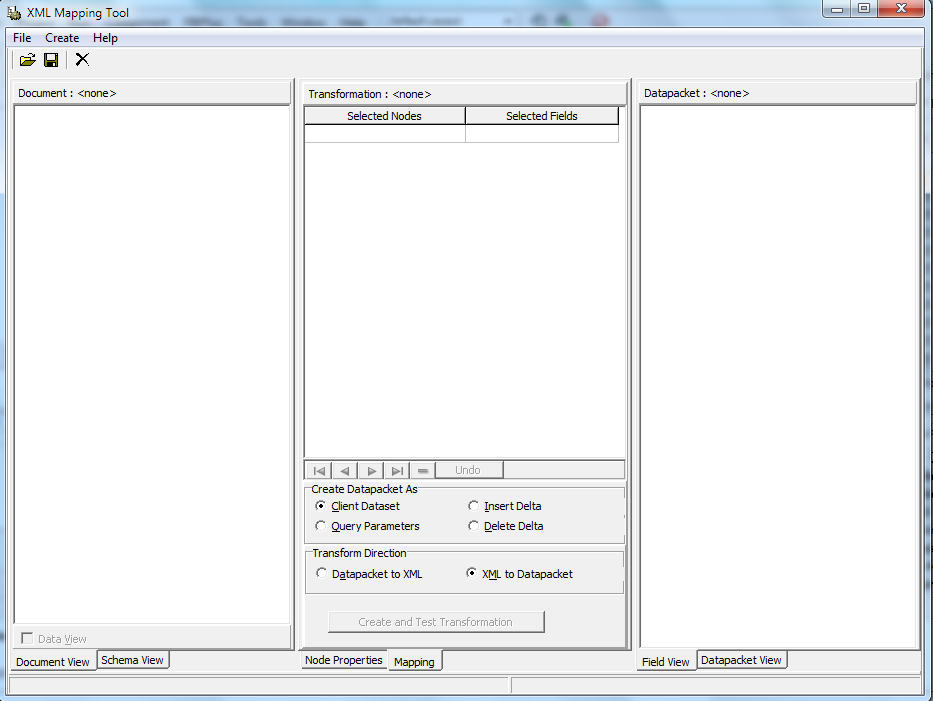
By using Delphi XE4 RAD Studio, you can create an XTR file from the given XML file using XML Mapper. XML Mapper Tool is provided in RAD Studio XE4 under Tools -> XML Mapper.

Following are the steps to create an XTR file from XML in Delphi XE4 using XML Mapper:

1. Open the XML Mapper Tools from RAD Studio. 


Now load an XML. In my case I am loading following simple XML:

<?xml version="1.0" encoding="UTF-8"?>
<Parent>
  <Child1>ABC</Child1>
  <Child2>XYZ</Child2>
</Parent>

All the nodes will appear on the left section of XML Mapper.

2. Right click on left section and select "Select All Children" option. Transformation will be created on the middle section.

3. Right click on left section again and select "Create Datapacket from XML". You will see the generated datapacket on the right section of the XML Mapper.

4. Hit "Create and Test Transformation" button in the middle section of XML Mapper.

5. Right click on the right section and select "Clear". A popup will appear asking you "Save changes to Transformation to Datapacket?".

6. Click Yes and save that XTR file.

I got following XTR file corresponding to the above XML file:

<XmlTransformation Version="1.0"><Transform Direction="ToCds" DataEncoding="UTF-8"><SelectEach dest="DATAPACKET\ROWDATA\ROW" from="\Parent"><Select dest="@Child1" from="\Child1"/><Select dest="@Child2" from="\Child2"/></SelectEach></Transform><XmlSchema RootName="Parent"><![CDATA[<xs:schema xmlns:xs="http://www.w3.org/2001/XMLSchema">
  <element xmlns="http://www.w3.org/2001/XMLSchema" name="Parent" type="ParentType"/>
  <complexType xmlns="http://www.w3.org/2001/XMLSchema" name="ParentType">
    <sequence>
      <element name="Child1" type="Child1Type"/>
      <element name="Child2" type="Child2Type"/>
    </sequence>
  </complexType>
  <element xmlns="http://www.w3.org/2001/XMLSchema" name="Child1" type="Child1Type"/>
  <simpleType xmlns="http://www.w3.org/2001/XMLSchema" name="Child1Type">
    <restriction base="xs:string"/>
  </simpleType>
  <element xmlns="http://www.w3.org/2001/XMLSchema" name="Child2" type="Child2Type"/>
  <simpleType xmlns="http://www.w3.org/2001/XMLSchema" name="Child2Type">
    <restriction base="xs:string"/>
  </simpleType>
</xs:schema>]]></XmlSchema><CdsSkeleton/><XslTransform/><Skeleton><![CDATA[<?xml version="1.0"?><DATAPACKET Version="2.0"><METADATA><FIELDS><FIELD attrname="Child1" fieldtype="string" WIDTH="3"/><FIELD attrname="Child2" fieldtype="string" WIDTH="3"/></FIELDS><PARAMS/></METADATA><ROWDATA/><METADATA><FIELDS><FIELD attrname="Child1" fieldtype="string" WIDTH="3"/><FIELD attrname="Child2" fieldtype="string" WIDTH="3"/></FIELDS><PARAMS/></METADATA><ROWDATA/></DATAPACKET>
]]></Skeleton></XmlTransformation>

Thursday, 17 January 2013

Best Free XML Editors and Viewers

Best Free XML Editors and Viewers

Here is the list of best free XML Editors and Viewers which will make it easy for you to understand XML. Professional XML editors will help you to write error-free XML documents, validate your XML against a DTD or a schema, and force you to stick to a valid XML structure.
An XML editor should be able to:

1. Add closing tags to your opening tags automatically
2. Force you to write valid XML
3. Verify your XML against a DTD
4. Verify your XML against a Schema
5. Color code your XML syntax

Need of an XML Editor

Today XML is an important technology, and development projects use XML-based technologies like:

1. XML Schema to define XML structures and data types
2. XSLT to transform XML data
3. SOAP to exchange XML data between applications
4. WSDL to describe web services
5. RDF to describe web resources
6. XPath and XQuery to access XML data
7. SMIL to define graphics
8. To be able to write error-free XML documents, you will need an intelligent XML editor!

List of Best Free XML Editors and Viewers

1. XML Notepad

XML Notepad is Microsoft’s contribution to the XML editor forum. Based in class on the popular text editor dispensed with Windows operating systems, Notepad, the XML module offers a semi WYSIWYG design. The tree view and text view are color coded and use bold shapes to identify the elements and their family relationships for XPath navigation. Overall, Microsoft’s XML Notepad is not a terrible choice for those with a basic understanding of XML. Additionally, the program helps design and produce XSL style sheets to accompany the XML information and create an output stream.

2. FOXE XML Editor

First Objective Software Inc. produces a free editor that works as an advanced text editor . FOXE offers some basic tools for authoring code but does not delve too far into styling. The program does provide some inherent code that allows you to navigate files, define XPath information and split documents. This is a decent choice for those learning to take baby steps in XML production. The tree view and embedded scripts make FOXE a better choice than a standard text editor, but the program still makes you work to learn  to write effective XML.

3. Serna Free – Open Source XML Editor

Serna is a WYSIWYG editor produced by Syntext that goes beyond the norm. Like most XML editors, Serna begins with the classic split screen and works exclusively in a WYSIWYG style. It will take some practice to get used to the interface, but once you understand the basic tools, creating your document is straightforward. This is an editor for someone who has a clear understanding of XML technology and looking for a shortcut. Newcomers need to understand the basics of valid XML before attempting to work within the Serna environment..

What is an XML File or XML Document? Why to use XML?

What is an XML File or XML Document? Why to use XML?

This article covers basics of XML. We will discuss some benefits and advantages of XML.

What is XML?

XML is Extensible Markup Language. XML is a specification developed by W3C. XML is a standard, simple, self-describing way of encoding both text and data so that content can be processed with relatively little human intervention and exchanged across diverse hardware, operating systems, and applications.

In brief, XML offers a widely adopted standard way of representing text and data in a format that can be processed without much human or machine intelligence. Information formated in XML can be exchanged across platforms, languages, and applications, and can be used with a wide range of development tools and utilities.

Example of XML Document

<bag label="Glenns Food" storage-date="October, 2001">
  <item>Candy Bar</item>
  <bag label="Vegetables" storage-date="Oct 11 2001">
 <item>Carrot</item>
 <item>Lettuce</item>
  </bag>
  <bag label="Fruits" storage-date="Oct 13 2001">
 <item>Pear</item>
  </bag>
</bag>

Difference between HTML and XML

XML is similar enough to HTML in its actual format. But there are two fundamental differences:

1. Separation of form and content -- HTML mostly consists of tags defining the appearance of text; in XML, the tags generally define the structure and content of the data, with actual appearance specified by a specific application or an associated stylesheet.

2. XML is extensible -- tags can be defined by individuals or organizations for some specific application, whereas the HTML standard tagset is defined by the World Wide Web Consortium (W3C).  

Advantages of XML

1. Simplicity

Information coded in XML is easy to read and understand, plus it can be processed easily by computers.

2. Openness

XML is a W3C standard, endorsed by software industry market leaders.

3. Extensibility

There is no fixed set of tags. New tags can be created as they are needed.

4. Self-description

In traditional databases, data records require schemas set up by the database administrator. XML documents can be stored without such definitions, because they contain meta data in the form of tags and attributes.

XML provides a basis for author identification and versioning at the element level. Any XML tag can possess an unlimited number of attributes such as author or version.

5. Contains machine-readable context information

Tags, attributes and element structure provide context information that can be used to interpret the meaning of content, opening up new possibilities for highly efficient search engines, intelligent data mining, agents, etc.

This is a major advantage over HTML or plain text, where context information is difficult or impossible to evaluate.

6. Separates content from presentation

XML tags describe meaning not presentation. The look and feel of an XML document can be controlled by XSL style sheets, allowing the look of a document (or of a complete Web site) to be changed without touching the content of the document. Multiple views or presentations of the same content are easily rendered.

7. Supports multilingual documents and unicode

This is important for the internationalization of applications.

8. Facilitates the comparison and aggregation of data

The tree structure of XML documents allows documents to be compared and aggregated efficiently element by element.

9. Can embed multiple data types

XML documents can contain any possible data type - from multimedia data (image, sound, video) to active components (Java applets, ActiveX).

10. Can embed existing data

Mapping existing data structures like file systems or relational databases to XML is simple. XML supports multiple data formats and can cover all existing data structures and

11. Provides a 'one-server view' for distributed data

XML documents can consist of nested elements that are distributed over multiple remote servers. XML is currently the most sophisticated format for distributed data - the World Wide Web can be seen as one huge XML database.

Tuesday, 1 January 2013

PHP JSON and XML Parser: How to Parse JSON and XML using PHP Script?

PHP JSON and XML Parser: How to Parse JSON and XML using PHP Script?

Parsing XML and JSON is very common application requirement as all the webservices provide data in the form of JSON and XML. PHP has very simple ways to parse XML and JSON. To parse JSON with PHP script, you have to use "json_decode" PHP function. We have given below the PHP JSON Parser code which is very simple. Similarly, using PHP script you can easily create PHP XML Parser. Using simplexml_load_string function, you can easily parse XML in PHP.

Below is the PHP code to parse JSON and XML:

PHP JSON Parser: How to Parse JSON using PHP Script?

$json_string='{"id":101,"name":"Harry","email":"harry@example.com","interest":["wordpress","php"]} ';
$obj=json_decode($json_string);
echo $obj->name; //prints Harry
echo $obj->interest[1]; //prints php

PHP XML Parser: How to Parse XML using PHP Script?

//xml string
$xml_string="<?xml version='1.0'?>
<users>
   <user id='101'>
      <name>Harry</name>
      <email>harry@example.com</name>
   </user>
   <user id='102'>
      <name>Harry2</name>
      <email>harry2@example.com</name>
   </user>
</users>";

//load the xml string using simplexml
$xml = simplexml_load_string($xml_string);

//loop through the each node
foreach ($xml->user as $user)
{
   //access attribute
   echo $user['id'], '  ';
   //subnodes are accessed by -> operator
   echo $user->name, '  ';
   echo $user->email, '<br />';
}

Tuesday, 15 May 2012

Alternative of XML: JSON (JavaScript Object Notation)

JSON (JavaScript Object Notation) is a lightweight data-interchange format. It is easy for humans to read and write. It is easy for machines to parse and generate.JSON is a text format that is completely language independent.

The JSON format is often used for serializing and transmitting structured data over a network connection. It is used primarily to transmit data between a server and web application, serving as an alternative to XML. JSON is a subset of The file type for JSON files is ".json". The MIME type for JSON text is "application/json"

Data Types in JSON

Data structures in JSON are based on key / value pairs. The key is a string, the value can be a numerical value, a boolean value (true or false), array or an object.

1. Number (integer or floating point)
2. String  (in double quotes)
3. Boolean (true or false)
4. Array (an ordered sequence of values, comma-separated and enclosed in square brackets; the values do not need to be of the same type)
Example: var continents = ["Europe", "Asia", "Australia", "Antarctica", "North  America", "South America", "Africa"];
5. Object (an unordered collection of key:value pairs with the ':' character separating the key and the value, omma-separated and enclosed in curly braces; the keys must be strings and should be distinct from each other)
Example: var mailingAddress = {  "Address" : "123 Anywhere St.",  "City" : "Springfield", "PostalCode" :   99999 };
6. null (empty)

JSON Parser

Since JSON syntax is a subset of JavaScript syntax, the JavaScript function eval() can be used to convert a JSON text into a JavaScript object. The eval() function uses the JavaScript compiler which will parse the JSON text and produce a JavaScript object.

The eval() function can compile and execute any JavaScript. This represents a potential security problem. It is safer to use a JSON parser to convert a JSON text to a JavaScript object. A JSON parser will recognize only JSON text and will not compile scripts. In browsers that provide native JSON support, JSON parsers are also faster. Native JSON support is included in newer browsers and in the newest ECMAScript (JavaScript) standard.

Similarities between XML and JSON

1. JSON and XML are plain text
2. JJSON and XML are "self-describing" (human readable)
3. JSON and XML are hierarchical.
4. JSON and XML can be parsed by JavaScript
5. JSON and XML data can be transported using AJAX

Differences between XML and JSON

1. Data types

XML: Does not provide any notion of data types. One must rely on XML Schema for adding type information.
JSON: Provides scalar data types and the ability to express structured data through arrays and objects.

2. Support for arrays

XML: Arrays have to be expressed by conventions, for example through the use of an outer placeholder element that models the arrays contents as inner elements. Typically, the outer element uses the plural form of the name used for inner elements.
JSON: Native array support

3. Support for objects

XML: Objects have to be expressed by conventions, often through a mixed use of attributes and elements.
JSON: Native object support.

4. Null support

XML: Requires use of xsi:nil on elements in an XML instance document plus an import of the corresponding namespace.
JSON: Natively recognizes the null value

5. Comments

XML: Native support and usually available through APIs.
JSON: Not supported.

6. Namespaces

XML: Supports namespaces, which eliminates the risk of name collisions when combining documents. Namespaces also allow existing XML-based standards to be safely extended.
JSON: No concept of namespaces. Naming collisions are usually avoided by nesting objects or using a prefix in an object member name.

7. Formatting decisions

XML: Complex. Requires a greater effort to decide how to map application types to XML elements and attributes. Can create heated debates whether an element-centric or attribute-centric approach is better.
JSON: Simple. Provides a much more direct mapping for application data. The only exception may be the absence of date/time literal.

8. Size

XML: Documents tend to be lengthy in size, especially when an element-centric approach to formatting is used.
JSON: Syntax is very terse and yields formatted text where most of the space is consumed (rightly so) by the represented data.

9. Parsing in JavaScript

XML: Requires an XML DOM implementation and additional application code to map text back into JavaScript objects.
JSON: No additional application code required to parse text; can use JavaScript's eval function.

10. Learning curve

XML: Generally tends to require use of several technologies in concert: XPath, XML Schema, XSLT, XML Namespaces, the DOM, and so on.
JSON: Very simple technology stack that is already familiar to developers with a background in JavaScript or other dynamic programming languages.

11. Tools

XML: Enjoys a mature set of tools widely available from many industry vendors.
JSON: Rich tool support—such as editors and formatters—is scarce.

12. Reserved Keywords

XML: There are reserved keywords.
JSON: No reserved keywords

JSON: An Alternative of XML

1. When data is encoded in XML, the result is typically larger than an equivalent encoding in JSON, mainly because of XML's closing tags. JSON is smaller than XML, and faster and easier to parse.

2. AJAX Support in JSON: Althought most browsers can construct, send, and parse XML, JavaScript Object Notation (or JSON) provides a standardized data exchange format that is better-suited for Ajax-style web applications.

For AJAX applications, JSON is faster and easier than XML:

Using XML

1. Fetch an XML document
2. Use the XML DOM to loop through the document
3. Extract values and store in variables

Using JSON

1. Fetch a JSON string
2. eval() the JSON string

About the Author

I have more than 10 years of experience in IT industry. Linkedin Profile

I am currently messing up with neural networks in deep learning. I am learning Python, TensorFlow and Keras.

Author: I am an author of a book on deep learning.

Quiz: I run an online quiz on machine learning and deep learning.