FREE UNLIMITED TRAFFIC

Website Traffic Exchange
 
Showing posts with label technology. Show all posts

How To Fit Technology With Your Overall 'Look'

1 comments
There was a time when technology was considered bulky, cumbersome and ugly. The image that we had in mind when we thought of 'technology' was normally of a big desktop PC and it certainly wasn't glamorous (even if they do have something of a 'retro cool' now).
But today all that has changed. It started with the iPod, but since then it has spread throughout the entire industry. Technology is now smaller, sleeker and sexier - and flaunting your iPad or your Surface Pro is now the in-thing to do. In short, technology is now an accessory in the same way that your jewellery is. So how are you going to make it work as part of your overall image?
The Overarching Vision
Of course the best way to make your technology more personalised and more stylish is to use cases, decals and generally anything that can add some colour or style to the usual shiny black plastic. This will make your item stand out and show that you've put thought into it, which will make it instantly more impactful and cooler.
But just sticking any old cover on your phone isn't going to cut it. If you really want to make your technology stand out, then you need to think about the overarching vision and you need to think about how it all fits into your grand plan.
Instead then, think about the kinds of clothes you normally wear, your watch and critically the bag your technology is going to go in. My laptop has a beautiful coffee coloured leather case, and this works perfectly with the brown leather bag giving my technology a studious and aged feeling. This wouldn't work nearly so well if I had a silver watch and a black bag. Of course you can always take this further by having multiple cases and decals for different occasions.
Think about your clothes, your jewellery and everything else - and then tie it all in.
The Customisation
Of course it's also possible to customise the actual technology itself in a number of ways, and you might choose to do this by changing the themes, by altering the wallpaper etc.
Whatever you decide to do though, you should think about how it all fits in. Some decals you can buy online will even come with a background to match - so that it looks like your entire device is encase in stars and the text is glowing through them. Alternatively you could feature your other accessories in your customisation. How about a wallpaper that's a high definition image of the ring you're wearing? Amazing attention to detail will really win you points here.
The Device
You also need to think about the device itself and what it says about you. Are you a technology fiend who wants an obscure device running Linux? Are you an arty type who loves Apple? Or are you a business executive who wants to work on something sleek and black from Microsoft?
Your technology is part of your identity these days in the same way jewellery is - so give it the thought it deserves.
Featured images:
The author of this post, Ryan Hall, has a keen interest in technology and resorts to guest blogging to share his thoughts and reviews. He is part of the team at Lior Diamonds, providers of fancy colored diamonds in Chicago.

Read more...

Video Mapping Techniques Using Projection Mapping Software

1 comments
Projection mapping software is a complicated and wonderful creation. To put all of its complexity into a simple description, it basically makes anything into a canvas for light. The creative software can transform any surface into a 2D or 3D display for its dynamic and colourful projections. Buildings, structures, trees, fields, mountains; you name it, projection mapping can use it. As with any creative technology, it is such a versatile art form. It is now used all over the world by artists, advertisers, companies and cult fashions.

Projected From the Past
Projection mapping has recently become a sensation as technology has advanced enough to get the most out of its capabilities. Even though it only seems to have come to light in the last few years, one of its early uses in entertainment was back in 1969 as part of a Disneyland ride! Imagine how scary it would have been for visitors to see hanging heads that look like they have real faces on them! All just a trick of the light… Even though modern methods are the most 'advanced', they all come from these milestones of creativity from the past, and give us a great building block for great current techniques.
Map making techniques have improved greatly over time.
Forward a decade into 1980 and projection mapping emerged once again in the public limelight. An artist showed us a great technique which has inspired current methods and projection mapping software of today. Michael Naimark used optical illusion to make it look like projected people were interacting with a physical environment. He filmed them in a living room first, and then projected them into the room after they were gone. These techniques turned heads and really opened up the questions for future advancements with industry giants, artists, and individuals alike. What if?

Not Quite a Blank Canvas
Mapping projection software can seem a little confusing to start with, but in reality it's easy if you just pull out one of the keywords - mapping. Normally a projector knows and is programmed to hit a blank, flat, rectangular screen. With this type of technology, the projector needs a 'map' to know where its screen is. You need to tell it the kind of surface it's projecting onto so you can create the effects you want to. Let's look at extreme canvases, and exciting video mapping techniques that use them!
So the first part of using landscapes and buildings in this projection technique means you have to make a 3D replica of the projection surface. The more detailed and true to life it is, the better the final result. The next step is to design the video and light show that you want to use on your giant surface. Projection mapping software will do what it does best, using masking and x/y/z co-ordinates to know where the projector is in relation to the subject and create your masterpiece. This technique, using outdoor and large-scale surfaces like skyscrapers need projectors that pack a punch, so make sure you find something between 15,000 and 20,000 lumens for maximum effect!

Musical Mapping
Combining your visual light show with a musical soundtrack has been extremely popular. Any composer, film producer or artist will tell you that sound and music add incredible depth to a visual piece. Creating amazing optical illusions can be enhanced by a circus themed soundtrack, exciting adventure projections could have a rock track played to accompany climbers, divers, skiers or bikers that appear to be scaling the sides of local landmarks! You may even opt for an eerie creak or cackle, with a hint of orchestral suspense music to add to the scare factor in your Halloween special show!
Modern maps are created with powerful software.
Not only is the musical accompaniment technique great for video mapping, it also works the other way around. Sound is also enhanced by light, projection and video! DJs, gigs, dance clubs and festivals all use lasers, lights, projection and incredible 3D effects that are synchronised perfectly with their songs. An artist called Deadmau5 used projection mapping software to not only make his songs more entertaining with a visual accompaniment, he actually made it look like a giant building nearby was shaking and moving in time with the music. Make landmarks come to life and doors dance with this great video mapping technique.

Conclusion
This is epic technology still has so much left to show with more and more ways it can be developed and enhanced. Techniques with projection mapping software are as creative as trying new tricks with a paintbrush. It's important to see what other artists are doing, how they are experimenting and pushing the boundaries, but ultimately, your own style should shine through. See your music dance in front of you, 5 or 50 feet tall, make mountains move and buildings boogie. These techniques are just the beginning; where will the software take you?
Featured images:
Written by Nathan Griffiths who is interested in video mapping techniques.


Read more...

Being Tech Savvy In A Self-Storage World

1 comments
Managers and owners of self-storage facilities absolutely need to be utilizing cutting edge technology for the day-to-day operations of their businesses.   They should be able to competently navigate their facility’s management software; and if need be, revamp their websites for more effective search engine optimization (SEO), and even experiment with pay-per-click advertising as well as blogs, articles and tips for consumers. 
We live in a time where patrons are drawn to automation; and as a result, they want what they want, when they want it.  If you’ve never used any kind of industry-specific software and choose to, you’ll wonder how you ever managed without it!
Let’s take a look at a few featured highlights of different software packages to get an idea of how  software can literally help run the business.  And ironically, one will find that while software will most certainly enhance one’s business and increase its growth, it will ironically reduce the manager’s or  owner’s work load!

Software Empowers Renters:

Potential renters will feel immediately empowered to do business with a self-storage facility since those customers can complete the rental process in, literally, a few minutes.  The software enables a payment to be made, provides an electronic storage agreement which is sent by email; and the manager receives  copies of all the correspondence sent to the customer. 

Software Increases Income:

A facility’s income can be increased by thousands of dollars a month by reducing such things as discounts, concessions and waived fees.   When storage-specific software provides on-demand financial analysis and auditing, it can deliver a more complete picture of the business.   Tenant-by-tenant analysis, for example, will determine how much, and when, to raise each tenant’s rent to boost the facility’s income.

Software Provides Instant Confirmation:

User-friendly, self-storage software caters to the facility’s owners and managers  by keeping records of tenants, income, occupancy, late fees, unit status, expenses, balance sheets, tax accounting and a myriad of other important business logistics. 
An ‘aerial’ feature allows operators to monitor a color-coded map representing the actual facility; and each color represents the status of every unit.  With a single click, unit information is instantly revealed concerning rate, size, tenant name, payment status and current balance.  Additionally, any adjustments can be made to any unit’s status, on the spot.

Software Offers Convenience:

Common operational tasks can be impressively steam-lined through automated billing and delinquency, detailed reporting and instant access to real-time data for all facilities in various locations.
Current customers can manage their accounts and pay bills on line; and prospective tenants can view real-time unit availability and reserve a unit via the facility’s website. While on-line, one can view locations regarding the office, keypads, elevators and restrooms. 

Software Equips Employees:

Since you can’t be the all-seeing, all-present element of your business 100% of the time, self-storage software can manage the rental counter and equip employees to provide exceptional customer service.  On one single screen, every piece of information any employee might need to know, is clearly displayed.  None of the data can be overlooked or forgotten and icons and color-coding reveal the exact status of any, and every, account.  Charges, payments, bad checks, notices, rent raises, and other information is readily available.
When multiple facilities exist, graphic overviews provide an instant display of how each facility is operating, how each location compares with other sites and what needs attention and what is running smoothly.  Ten different performance areas are scrutinized; and each site gets a ‘report card’ with color-coded flags using three levels of assessment:  ‘action needed’ (red), ‘be on the alert’ (yellow), and ‘all is well’ (green).
Technology continues to be a strong emphasis within K. Carlson’s authoring in Nebraska.  From storage facilities to real estate, she has truly shined a light on the ubiquitous nature of innovation.

Read more...

Achieve Cost Savings By Outsourcing In These Four Areas

1 comments
Finding ways to streamline your business processes can help you to excel in the competitive marketplace. Outsourcing some of your company's activities to professional firms can reduce your overhead expenses and provide you with superior services performed by experts in the field. Here are four areas in which your business may achieve savings and improved service through outsourcing to a professional firm.

Maintenance
Employing a full-time maintenance staff can be costly. For smaller companies, hiring a local firm to manage maintenance duties on an as-needed basis can provide considerable savings over employing staff members directly. Housekeeping duties can usually be outsourced as well, for even more savings on salaries and benefits. If your company requires maintenance services only infrequently, contracting with an outside firm can provide significant financial benefits.

Information technology
Your IT department can provide on-the-spot assistance with a wide range of computing problems. However, if your company is also maintaining servers for online activities or to facilitate in-house tasks, you may be able to save money by transferring these functions to a hosting services provider. These knowledgeable experts can often deliver faster page load times and improved protection for your company's valuable data. Choosing a service provider with a 24-hour help desk can ensure that any problems can be resolved quickly as they arise.

Marketing
Especially for companies new to the online advertising and promotions field, outsourcing your marketing activities can increase your visibility in the consumer marketplace and ensure that all elements of your campaigns are managed effectively. Professional marketing firms offer an array of services that typically include the following:

• Online reputation management and monitoring
• Pay-per-click advertising
• Targeted banner ads in selected online venues
• Social media marketing
• Traditional print and media advertising strategies
• Integrated branding efforts that include logo designs

By entrusting these activities to a professional firm rather than attempting to manage them on your own, you can achieve greater saturation in your local market and improved visibility in the online community.

Contract creation and management
Rather than attempting to track, compare and manage vendor and supplier contracts in-house and by hand, you may achieve better results by opting for a hosted solution from a contract management company. These advanced software specialists typically offer tiered services that range from software platform installations to full hosting services for your company's valuable contract data. Enlisting the help of experts in contract software platforms to store and offer access to your valuable corporate information can provide a number of benefits:

• Added security for your data
• Improved access options for staff members
• Redundant storage strategies that prevent data loss
• Expert help in managing your agreements and retrieving them for future use

Contract management experts can help you manage your company's sensitive data and can provide you with in-depth reporting functions that allow you to identify areas of concern within your vendor network.

By outsourcing some or all of these activities to professional service providers, your company can often achieve significant cost savings while improving the level of performance in these four critical areas of your business operations.
Cassandra is a business writer with expertise in workflows and optimization of business practices. She recommends using a certain amount of outsourcing and/or software tools from contractlogix.com to make businesses leaner and more competitive.

Read more...

Software For Auto Mechanics

0 comments
Auto mechanics used to have to run their business strictly by pen and paper, keeping track of customers, services provided in the past, inventory and accounting.  Today there are software programs to aid mechanics in running a fine tuned shop without all the paperwork.

What are some applications of auto mechanics?

Auto mechanics software helps to do estimates in a few easy clicks.  You can easily figure labor time and import the estimated parts. You can also import part estimates from other mechanic shops to assist in comparable quotes. 
Work orders are easily written to give instructions to technicians.  This feature will break down in detail the work to be done, and making it easier for the customer to understand the service bill. This feature will also assist the mechanic in which part of the job is most profitable.
You can also track information about the customer, any complaints, satisfaction reviews and so on.  You can find out about any reviews on your business made by existing customers.  This information becomes increasingly valuable for any company desiring to maintain a viable marketing campaign as a business.  Consumer reports have become a real significant factor in the world of commerce these days.
Look up feature allows you to keep track of previous work done for customers.  This application allows you to type in the customer’s name and pull up any previous work orders.
The scheduling application allows you to drag the job description over to the technician’s column, calculating the length a job will entail.
The history function automatically tracks the mileage on the vehicle, for example, when the oil was changed.  This is also printable for the customer’s copy allowing the customer to plan ahead when the next service is due. 
Inventory management gives you the features to manage your stock pile of inventory.  The quick order system allows you to cross reference parts, and automatically calculates when a part was used, and puts in an order to restocking. Four pricing levels are available, marking the prices according to your profit margin.
A good file sharing program as seen on RLink can also be a great way to streamline the usage of software within a shop. 

Auto mechanics software comes in 3 different versions. 

-Autoshop GS-This is the very basic edition, however, this program is user friendly and has all the functions you need to get started in business.  While any user wil inevitable need to upgrade, this furnishes a great opportunity to get acquainted with the program before diving in head first, while giving you a clear picture of what one is getting himself into.
-Autoshop Pro-Provides all the basics of GS, but also includes writing estimates, work orders, sales and inventory.  This software can be used as an upgrade to GS as your business grows.
-Autoshop Premium-At a much higher cost, you can upgrade to premium.  This software has all the functions of Pro however, premium interfaces with the bigger retail auto stores, allowing you to get information with just a click of the mouse. 
Auto mechanics software can help you grow your business in the most efficient and professional way!
Businesses and consumers alike are both gaining from the time Cindi devotes to the world of technology.  Be it a free FTP server or a emulation software, she knows her stuff, and would write more if she was not employed full time in Missouri as a medical coder.

Read more...

How Can An IVR System Help You Business To Grow?

0 comments
If you run a small start up company and are looking to grow your business, knowing where to go next can be hard. 
Even if you’ve got lots of work coming up, having a limited workforce can mean taking on new jobs is impractical, when even managing your current tasks can be a challenge. 
Having someone to take on some of the workload can make a huge difference, and if you don’t have the resources to pay another member of staff, this is where a virtual receptionist could save the day. 

What is an IVR system?
If you’re unfamiliar with the workings of a virtual office, IVR simply stands for Interactive Voice Response, and it’s the system that you’ll normally encounter when calling any big company or organisation. 
An IVR system greats callers and then lets them interact with the menu, either with their voice or the telephone keypad, to choose an option and then be directed to the appropriate department or employee.
In most companies it has pretty much replaced the old fashioned switchboard and allows enquiries to be dealt with quickly and efficiently.
If no one is available to deal with the enquiry, the caller will normally be diverted to a voicemail service.
IVR phone systems have effectively replaced the old fashioned switchboard.
Freedom to keep working
The main respect, in which an IVR system will help your business to grow, is that it will enable you to keep working and allow your answering system to handle incoming calls. 
The IVR will allow callers to select an option, and the system will then route the call to your mobile or landline, so you can be out and about work and bringing in new contracts, without having to worry about missing new leads. 
You can also set the calls to go to voicemail if you’re busy with clients, that way you’re not disturbed during your meeting, but the enquiry still gets dealt with a professional way. 
An IVR system also allows you to work collaboratively at the same time as working remotely. Calls can be forwarded to different recipients depending on the subject, but you don’t have to work from the same office or even the same city as your colleagues. 

Giving your business a professional appearance
Another main benefit of an IVR phone system is the professional air that it lends to your company’s image. 
Callers will instantly think that your company is large and established, with plenty of employees and a sizable office. You can also personalise the greeting that people hear when they call up to make it relevant and personal to your company.
This will all help to give customers and prospective client’s faith in your business and should help you to secure more work as a consequence.
An IVR system provides you with a sort of virtual secretary
Eliminates the need for an expensive office
Thanks to the mobile nature of the system, it eliminates the need for you to hire a real office. An expense that can be crippling for young businesses, especially when you add in the cost of bills, office supplies and maintenance.
Avoiding these costs will help to free up funds that can then be channelled into other areas of your business like development and future planning. 
If you’re a busy sole trader, or simply want to make your business as streamlined as possible, an IVR phone system could help you to cut costs, manage your workload and improve your company image.
Giving you the time and the opportunity to grow and develop your company into a successful and thriving new endeavour.
Featured images:

An article by Ian Marshall the owner of Office Answers, a keen technology writer and an advocate of IVR phone systems. Click here to learn more about this software.
Read more...

What Are Target Oriented Tracking Systems (TOTS)?

3 comments
Target Oriented Tracking Systems, known as TOTS for short, are mainly implemented in military settings in today's world. While these systems are incredibly complex, and have been developing over decades, this article aims to break down what Target Oriented Tracking Systems are all about.

Depending on your field of expertise, this information could be beneficial for your understanding, and even help your future career! Scientists, engineers, and at-home-enthusiasts - read on!

In Layman's Terms
Target Oriented Tracking Systems is certainly a modern tongue twister, and a mind boggler to try to understand! The programming and craftsmanship involved in developing the systems is very advanced indeed, however the aim of the system is rather simple. TOTS are there to sense targets: think of radar, but much more advanced. Target Oriented Tracking Systems do exactly what the title suggests; the system can track multiple targets in real time to allow you to monitor these targets in many different situations.

Jack Of All Trades, Master of Surprise!
TOTS is a generic system, so it can be used in all manner of ways. Most of the systems in current usage are found in the military, simply because of how essential its features are to such an environment. Target Oriented Tracking Systems can even monitor air being breathed in a close-quarters venture into enemy territory to help identify the presence of a person. There's nothing more important than the element of surprise, and TOTS could help our troops avoid danger, or the enemy getting the drop on them!

TOTS is also used heavily for missile tracking. Tracking information about a missile launch is vital. It is extremely important to know that your missile is on the right path to a successful target but even more essential is the ability to detect and track an enemy missile! Knowing the position, speed and velocity of an inbound rocket could be crucial to the safe escape of people in the danger zone.

Target Oriented Tracking Systems are also used in the naval field, monitoring surface targets. Whether you're monitoring the position of an enemy fleet, or simply locating an ally ship, TOTS helps you stay one step ahead.

Under Construction
Past its prime; A rusty, old radar system is now a museum feature.  
The principles and technologies involved in Target Oriented Tracking Systems have come a long way from their humble beginnings. During the middle of the 1980s, computers and technology around the world were being rapidly developed. And alongside the global electronic development, TOTS was beginning born, and rocketed towards success.

Originally, the tracking systems were implemented to help stop the armada of potential threats as a result of the cold war. But imagine the lives that have now been safeguarded by systems to detect incoming threats before they hit their targets! Since the development of the early systems, today's Target Oriented Tracking has reached an incredible level of complexity and ability.

TOTS Today
Today's Target Oriented Tracking Systems can achieve jaw-dropping feats in comparison to its predecessors. The accuracy of the tracking of a target is near pinpoint, and prediction of the target's time and position of arrival can be almost spot on (based on a large number of variables that the system is able to calculate), all the while showing this information to the user.

Since warfare and ballistic capability has advanced to such a high-tech level, TOTS has kept pace and even gone beyond so that its systems can always keep on top of potential attackers. TOTS can be used to detect a very large number of targets, in a huge number of environments, including tracking multiple targets simultaneously, and detecting when one object separates from another. This can be vital in the case of a parent object splitting from its payload.

Conclusion
As we charge further into an unpredictable future, it is great to know we can depend on Target Oriented Tracking Systems to always keep us one step ahead. Being protected and guided by such advanced technology gives us the peace of mind and security of knowing that even when our guard is down, TOTS is on the lookout. As tracking systems continue to develop, who knows what incredible possibilities are on the horizon? What we do know, however, is that whatever ventures that TOTS are aiming for, they will always be right on target.
Featured images:
An article by Nathan Griffiths who loves writing a wide range of technology related articles.
Read more...

The 5 Steps To CAD Software Heaven

0 comments
Computer aided design software is a fantastic tool, but taming it isn't always the easiest of tasks. Your frustrations and limitations with CAD can sometimes seem like purgatory, and on rare occasions working with it can be hell! Have no fear, and don't lose hope; your saviour has come. There are 5 great steps that you can take towards CAD Software Heaven, and if you follow them all, you could be at the pearly gates of success before you know it.

Step 1: Onward and Upgrade
When old faithful might not make it, perhaps it's time for a newer model 
Before you train yourself, and embark on your pilgrimage to program paradise, make sure that you're not using an old doctrine. Puns and clever lines aside, if you're using old software, the first thing to do is to upgrade. While older versions of CAD software are tried and true, companies are always at work to improve their products. They invest thousands, even millions in making their CAD software more accessible, user friendly and all in all a better performer in its field. If you want to get to software heaven, make sure that you're not sticking to your old programmes religiously.

Step 2: Time to Train
The best investment that you could possibly make towards reaching CAD nirvana is to cast down your nets, and follow someone who knows better. The great thing about CAD software is that it is extremely well equipped for training purposes and if CAD were to have one commandment, it would be 'thou shalt always train'. CAD software has unprecedented tutorials, both inbuilt and online. Training is available through a wide number of companies internationally, and is helping thousands of organisations stay on the cutting edge of their industry. It is vital for any company to be in the know, ahead of the competition, and to be the best in the business. Don't get left behind; get training!

Step 3: Another Dimension
Think in three dimensions; the world isn't flat any more. 
3D is the future of Computer Aided Design. In fact, it is the present, and the future. Currently, computer aided design software is getting better and better in terms of its three dimensional potential. Learn how to master its 3D tools, and your business will flourish, no matter how small or large. CAD heaven begins with 2D, and more often than not, ends in 3D. Once you've learnt how to wield the power that it promises, you will wow your clients, customers and colleagues. Photorealistic images and animations will help take your CAD capabilities out of this world.

Step 4: Broaden your Horizons
Often, the key to success lies in branching out. There are a huge number of environments and avenues that CAD software can lead you down, and be applied in. Your business will benefit hugely, and your experience with CAD could be heavenly. Do your homework, and explore the ways in which CAD is being used in other industries. Did you know, for example, that CAD can be used to design electronics and robotics? Did you know that it can be used to make animations and movies, 3D models, and to scan real objects onto your computer using laser technology? If not, perhaps it's time to stretch your boundaries, and who knows what computer aided design blessings you could discover.

Step 5: Believe in Miracles
Even after you follow these steps, sometimes there are still mountains that you just can't move. CAD is brilliant; it is always improving, and always becoming more user friendly. Even though it's a powerful tool, it still isn't perfect, and even though you've gone on training, sometimes things still go wrong. When you're in need, call the experts.

The final step towards CAD heaven is to understand the importance of good IT support. They can help you install your software, they'll help address your issues, and they'll always be ready and willing, should you encounter something that is beginning to make you lose faith in your abilities.

Whether you're a new convert to CAD, or a seasoned veteran, there are always ways to revolutionise your experience with Computer Aided Design software. Following these 5 steps will ensure that you're on the right path towards enlightenment, and on your way to the pearly gates of CAD heaven.
Featured images:

An article by Matt Scott who recommends ArtiCAD Software as a good example of the CAD software genre.


Read more...

Save Valuable Time And Money With Quickbooks

1 comments
Quickbooks softwareWhenever discussing the subject of accounting, Quickbooks is the most well-liked and sought out sales software within the sales industry on the market today. Besides the convenience it offers to non-accounting customers, it also offers excellent advanced tools to customers that not only improves the overall effectiveness of its users, but provides great value in other areas as well.

Intuit, creators of Quickbooks, continually produces Quickbooks in different versions and editions to suit the business requirements of various customers, providing all of them with tremendous knowledge in order to satisfy the various accounting needs of a business of individual. An individual might happen to be a CPA or a business owner that has to organize accounts, and a certified accountant may need Quickbooks for the entire year for their core procedures. They also might have different customers for whom they have been preparing various company accounts.

Business owners may make use of Quickbooks every now and then to prepare their company accounts as well. Any person using Quickbooks software should first take care of a couple of things before purchasing it, such as:
  • Are they going to get a good return on investment if they buy the product?
  • How much they actually need to learn about Quickbooks software
  • How do the plan on utilizing Quickbooks
  • Which type of Quickbooks software program do they need?
Quickbooks saves both time and money:
Cost certainty is really needed for the majority of companies today. Purchasing software for very limited usage is not advisable. Today, it is possible to employ a Quickbooks web hosting company or software supplier that will provide all of the necessary software on a rental basis, allowing customers to pay based on usage rate. For instance, if a company or individual needs to use it for only a few months time, they can choose a monthly contract and ask for an early termination of service once the work is finished, and without having to pay an early termination fee.

Software programs for lease will always give you the option to continually change to the updated software programs which suit their your business needs instead of having to always purchase new software. Having the software set up by a Quickbooks hosting service provider will also give you the opportunity to have an economical service package which will include the leasing of Quickbooks, as well as hosting for it. Leasing Quickbooks will reduce the cost of accounting, and Quickbooks web hosting will also lessen the IT costs incurred for accounting. Having a good Quickbooks hosting provider will guarantee strong business continuity by providing this advanced technology to your clients.
This software also includes advanced load balancing and solid fail-safe systems. It also offers great network security, firewall protection, and the most up-to-date anti-virus solutions. These help to safeguard one's vital online data from intruders such as viruses, bugs, Trojans, and worms. Also, the most up-to-date encryption technology with restricted access will make your online date much safer. This is why Quickbooks is the ideal software for your business needs.
Featured images:
  •  License: Royalty Free or iStock source: http://officeimg.vo.msecnd.net/en-us/images/MH900389712.jpg
This article was written by Ryan Archor, a Quickbooks software expert and writer. To find out more about why Quickbooks hosting is important for your business, check out this great Quickbooks hosting company, MyVAO.com.

Read more...

The New Face of 21st Century Cyber Warfare

0 comments
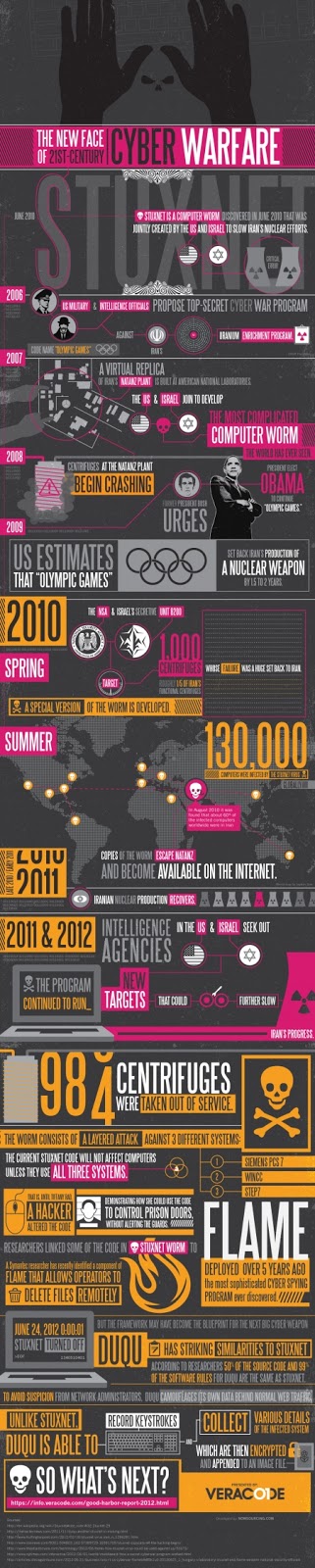
There's no question that business and economy today relies heavily on digital media and online commerce in order to not only excel, but to keep keep up with competition. From online and mobile gateways, social media platforms, and enterprise applications, there are countless ways by which any business can be connected to and take advantage of online and digital advances in order to make their business shine. However, in the course of using online technology to advance business goals, there is always a chance of making oneself vulnerable to online risks and predators, no matter how well informed you are. For instance, Stuxnet, a computer worm jointly developed by the U.S. and Israel in 2010 strictly for international security purposes, is now a worldwide internet threat to business and individuals alike who innocently browse the internet. This infographic, The New Face of 21st Century Cyber Warfare, gives the details on how this possible could be, along with the history of Stuxnet.

This infographic was made by ClickSoftware field service management, the leading provider of field service and application security from Veracode.

Read more...

XOLO Smartphone - Powered With Intel Inside

5 comments
Black is Beauty
Let's give a huge round of blows to this new smartphone XOLO X900. This is one of the smartphone which is filled with all the latest features which are required by todays smart users powered by Intel Inside.This is the first brand of the company which comes with Intel Inside technology which means you have the complete pc solution with this smartphone. The stylish and sleek of XOLO X900 is all about speed and performance, which is meant and designed to provide a responsive, immersive and engaging experience to address the need for a dynamic smartphone for today’s generation.

Intel’s cutting-edge technology and XOLO’s design innovation have come together to make the new XOLO X900 a compulsive choice. Whether it is speed of browsing and processing in a multi-tasking environment, or it is speed of the graphics clock to provide responsive and immersive video and gaming experience, XOLO X900 sets the “gold standard” in the fast-paced premium smartphone space. Everything you have always wanted, and more, now comes to you, in the blink-of-an-eye.

Features

1.6 GHz Processor
Speed that keeps up with you
Intel® Atom™ 1.6 GHz processor with Hyper-Threading Technology and 1GB RAM makes the XOLO X900 the benchmark in its class. Fast web browsing, responsive apps and effortless multi-tasking makes you enjoy the things you love to do, all in the blink-of-an-eye.

8MP Camera with Burst Mode

Discover the brilliance of a DSLR
Use the advanced 8MP HD camera with photo-burst mode that lets you capture images quickly - 10 photos in less than a second in one click. So you never miss the best shot, ever.

400 MHz Graphics Engine
Gaming and multimedia now turn real
The high speed 400 MHz graphics engine provides rich and immersive 3D gaming with super-responsive graphics.  Combined with the high resolution 1024X600 pixels display, XOLO gives you a full HD video output on the go. Ensures you never have a dull moment.


Specifications

  • The actual available internal phone storage may differ depending on the software configuration of your phone.
  • Features and specifications are subject to change without prior notification.
  • XOLO X900 uses a Micro SIM card for mobile network connections.
Softwares & Downloads


Upgrade through OTA (Over the air)
Download instructions for software upgrade through FOTA              Download

Upgrade through USB
Download software for upgrade through USB                                      Download

Instructions for software upgrade
Download instructions for software upgrade through USB               Download

Visit Oficial Site                                    Buy Now Xolo X900

Your reviews are important for the millions of visitors. So please take pride in reviewing this smartphone and let the visitors know your thoughts which will help them in buying the smartphone.
Read more...