Showing posts with label FindControl. Show all posts
5

GridView XML Edit Delete Insert Update

GridView XML Edit Delete Insert Update. In this example i'm explaining how to Edit Delete Insert and update XML file data in GridView using C# and VB.Net in Asp.Net.
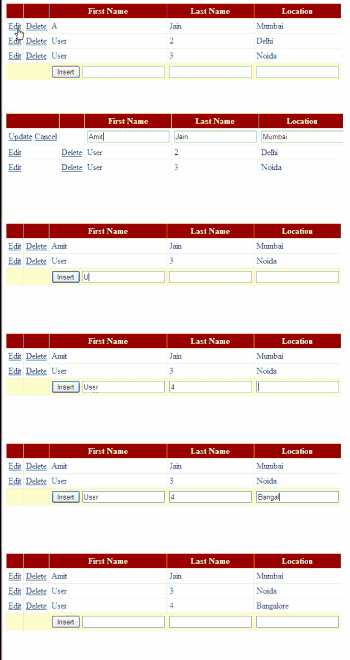
GridView Xml Edit Delete Insert Update Asp.Net
I have created a XML file with three fields Firstname,LastName and Location.

XML file looks like mentioned below.


Amit Jain Mumbai
User 3 Noida
User 4 Bangalore

I have placed one gridview on aspx page and three textbox in editItemTemplate of gridview for editing, one button and three textbox in Footer Template for Inserting new records in XML file.

HTML SOURCE OF PAGE
<asp:GridView ID="GridView1" runat="server" 
              AutoGenerateColumns="False" ShowFooter="True" 
              onrowcancelingedit="GridView1_RowCancelingEdit" 
              onrowdeleting="GridView1_RowDeleting" 
              onrowediting="GridView1_RowEditing" 
              onrowupdating="GridView1_RowUpdating" 
              onrowcommand="GridView1_RowCommand">
<Columns>
<asp:CommandField ShowEditButton="true" />
<asp:CommandField ShowDeleteButton="true" />
 
<asp:TemplateField HeaderText="First Name">
<ItemTemplate>
<asp:Label ID="lblFname" runat="server" Text='<%#Eval("FirstName") %>'/>
</ItemTemplate>
<EditItemTemplate>
<asp:TextBox ID="txtFirstName" runat="server" Text='<%#Bind("FirstName")%>'/>
</EditItemTemplate>
<FooterTemplate>
<asp:Button ID="btn" runat="server" Text="Insert" CommandName="InsertXMLData"/>
<asp:TextBox ID="txtFirstNameInsert" runat="server"/>
</FooterTemplate>
</asp:TemplateField>
 
<asp:TemplateField HeaderText="Last Name">
<ItemTemplate>
<asp:Label ID="lblLname" runat="server" Text='<%#Eval("LastName") %>'/>
</ItemTemplate>
<EditItemTemplate>
<asp:TextBox ID="txtLastName" runat="server" Text='<%#Bind("LastName") %>'/>
</EditItemTemplate>
<FooterTemplate>
<asp:TextBox ID="txtLastNameInsert" runat="server"/>
</FooterTemplate>
</asp:TemplateField>
 
<asp:TemplateField HeaderText="Location">
<ItemTemplate>
<asp:Label ID="lblLocation" runat="server" Text='<%#Eval("Location") %>'/>
</ItemTemplate>
<EditItemTemplate>
<asp:TextBox ID="txtLocation" runat="server" Text='<%#Bind("Location") %>'/>
</EditItemTemplate>
<FooterTemplate>
<asp:TextBox ID="txtLocationInsert" runat="server"/>
</FooterTemplate>
</asp:TemplateField>
</Columns>
</asp:GridView>


c# CODE
protected void Page_Load(object sender, EventArgs e)
    {
        if (!Page.IsPostBack)
            BindGridView();
    }
    protected void BindGridView()
    {
        DataSet dsXML = new DataSet();
        dsXML.ReadXml(Server.MapPath("~/App_Data/XMLFile.xml"));
        GridView1.DataSource = dsXML;
        GridView1.DataBind();
        GridView1.ShowFooter = true;
    }

    protected void GridView1_RowDeleting(object sender, GridViewDeleteEventArgs e)
    {
        BindGridView();
        DataSet dsGrid = (DataSet)GridView1.DataSource;
        dsGrid.Tables[0].Rows[GridView1.Rows[e.RowIndex].DataItemIndex].Delete();
        dsGrid.WriteXml(Server.MapPath("~/App_Data/XMLFile.xml"));
        BindGridView();

    }
    protected void GridView1_RowEditing(object sender, GridViewEditEventArgs e)
    {
        GridView1.ShowFooter = false;
        GridView1.EditIndex = e.NewEditIndex;
        BindGridView();
    }
    protected void GridView1_RowUpdating(object sender, GridViewUpdateEventArgs e)
    {
        int index = GridView1.Rows[e.RowIndex].DataItemIndex;
        string firstName = ((TextBox)GridView1.Rows[e.RowIndex].FindControl("txtFirstName")).Text;
        string lastName = ((TextBox)GridView1.Rows[e.RowIndex].FindControl("txtLastName")).Text;
        string location = ((TextBox)GridView1.Rows[e.RowIndex].FindControl("txtLocation")).Text;
        GridView1.EditIndex = -1;
        BindGridView();
        DataSet dsUpdate = (DataSet)GridView1.DataSource;
        dsUpdate.Tables[0].Rows[index]["FirstName"] = firstName;
        dsUpdate.Tables[0].Rows[index]["LastName"] = lastName;
        dsUpdate.Tables[0].Rows[index]["Location"] = location;
        dsUpdate.WriteXml(Server.MapPath("~/App_Data/XMLFile.xml"));
        BindGridView();
        
    }
    protected void GridView1_RowCancelingEdit(object sender, GridViewCancelEditEventArgs e)
    {
        GridView1.EditIndex = -1;
        BindGridView();
    }

    protected void GridView1_RowCommand(object sender, GridViewCommandEventArgs e)
    {
        
        if(e.CommandName == "InsertXMLData")
        {
        string firstname = ((TextBox)GridView1.FooterRow.FindControl("txtFirstNameInsert")).Text;
        string lastname = ((TextBox)GridView1.FooterRow.FindControl("txtLastNameInsert")).Text;
        string location = ((TextBox)GridView1.FooterRow.FindControl("txtLocationInsert")).Text;
        BindGridView();
        DataSet dsInsert = (DataSet)GridView1.DataSource;
        DataRow drInsert = dsInsert.Tables[0].NewRow();
        drInsert["FirstName"] = firstname;
        drInsert["LastName"] = lastname;
        drInsert["Location"] = location;
        dsInsert.Tables[0].Rows.Add(drInsert);
        dsInsert.WriteXml(Server.MapPath("~/App_Data/XMLFile.xml"));
        BindGridView();
        }
    }

VB.NET
Protected Sub Page_Load(sender As Object, e As EventArgs)
 If Not Page.IsPostBack Then
  BindGridView()
 End If
End Sub
Protected Sub BindGridView()
 Dim dsXML As New DataSet()
 dsXML.ReadXml(Server.MapPath("~/App_Data/XMLFile.xml"))
 GridView1.DataSource = dsXML
 GridView1.DataBind()
 GridView1.ShowFooter = True
End Sub

Protected Sub GridView1_RowDeleting(sender As Object, e As GridViewDeleteEventArgs)
 BindGridView()
 Dim dsGrid As DataSet = DirectCast(GridView1.DataSource, DataSet)
 dsGrid.Tables(0).Rows(GridView1.Rows(e.RowIndex).DataItemIndex).Delete()
 dsGrid.WriteXml(Server.MapPath("~/App_Data/XMLFile.xml"))
 BindGridView()

End Sub
Protected Sub GridView1_RowEditing(sender As Object, e As GridViewEditEventArgs)
 GridView1.ShowFooter = False
 GridView1.EditIndex = e.NewEditIndex
 BindGridView()
End Sub
Protected Sub GridView1_RowUpdating(sender As Object, e As GridViewUpdateEventArgs)
 Dim index As Integer = GridView1.Rows(e.RowIndex).DataItemIndex
 Dim firstName As String = DirectCast(GridView1.Rows(e.RowIndex).FindControl("txtFirstName"), TextBox).Text
 Dim lastName As String = DirectCast(GridView1.Rows(e.RowIndex).FindControl("txtLastName"), TextBox).Text
 Dim location As String = DirectCast(GridView1.Rows(e.RowIndex).FindControl("txtLocation"), TextBox).Text
 GridView1.EditIndex = -1
 BindGridView()
 Dim dsUpdate As DataSet = DirectCast(GridView1.DataSource, DataSet)
 dsUpdate.Tables(0).Rows(index)("FirstName") = firstName
 dsUpdate.Tables(0).Rows(index)("LastName") = lastName
 dsUpdate.Tables(0).Rows(index)("Location") = location
 dsUpdate.WriteXml(Server.MapPath("~/App_Data/XMLFile.xml"))
 BindGridView()

End Sub
Protected Sub GridView1_RowCancelingEdit(sender As Object, e As GridViewCancelEditEventArgs)
 GridView1.EditIndex = -1
 BindGridView()
End Sub

Protected Sub GridView1_RowCommand(sender As Object, e As GridViewCommandEventArgs)

 If e.CommandName = "InsertXMLData" Then
  Dim firstname As String = DirectCast(GridView1.FooterRow.FindControl("txtFirstNameInsert"), TextBox).Text
  Dim lastname As String = DirectCast(GridView1.FooterRow.FindControl("txtLastNameInsert"), TextBox).Text
  Dim location As String = DirectCast(GridView1.FooterRow.FindControl("txtLocationInsert"), TextBox).Text
  BindGridView()
  Dim dsInsert As DataSet = DirectCast(GridView1.DataSource, DataSet)
  Dim drInsert As DataRow = dsInsert.Tables(0).NewRow()
  drInsert("FirstName") = firstname
  drInsert("LastName") = lastname
  drInsert("Location") = location
  dsInsert.Tables(0).Rows.Add(drInsert)
  dsInsert.WriteXml(Server.MapPath("~/App_Data/XMLFile.xml"))
  BindGridView()
 End If
End Sub

Build and run the application.

Download Sample Code


0

Export Selected GridView Rows To Excel

This example explains how to Export Selected GridView Rows To Ms Excel Using CheckBox In Asp.Net 2.0,3.5,4.0 C# And VB.NET.
Place a gridview on aspx page, add checkbox control in it using TemplateField and ItemTemplate to select rows and populate gridview from database, add one button for exporting gridview rows to excel.

Export Selected GridView Rows to excel
I have used Northwind Database and customers table to populate gridview.
you can follow link to know how to install it on sql server 2008.

in one of my previous posts Export Gridview To Excel, i described how to export gridview containing controls like linkbutton, checkbox,dropdown etc to excel. I'll be using this code further to export selected rows.

Set DataKeyNames property of gridview to CustomerID.

HTML MARKUP
<asp:GridView ID="GridView1" runat="server" AllowPaging="True" 
              DataSourceID="sqlDataSourceGridView" 
              DataKeyNames="CustomerID" 
              AutoGenerateColumns="False"
              onpageindexchanging="GridView1_PageIndexChanging" 
              onrowdatabound="GridView1_RowDataBound" >
<Columns>
<asp:TemplateField>
     <ItemTemplate>
          <asp:CheckBox ID="chkSelect" runat="server" />
     </ItemTemplate>
</asp:TemplateField>
<asp:TemplateField HeaderText="Customer ID">
     <ItemTemplate>
          <asp:LinkButton ID="lButton" runat="server" 
                          Text='<%#Eval("CustomerID") %>' 
                          PostBackUrl="~/Default.aspx" >
          </asp:LinkButton>
     </ItemTemplate>
</asp:TemplateField>
<asp:BoundField DataField="CompanyName" HeaderText="Company">
</asp:BoundField>
<asp:BoundField DataField="ContactName" HeaderText="Name">
</asp:BoundField>
<asp:BoundField DataField="City" HeaderText="city">
</asp:BoundField>
<asp:BoundField DataField="Country" HeaderText="Country" 
&lt;/asp:BoundField>
</Columns>
</asp:GridView>
       
<asp:SqlDataSource ID="sqlDataSourceGridView" runat="server" 
ConnectionString="<%$ ConnectionStrings:northWindConnectionString %>" 
SelectCommand="SELECT [CustomerID], [CompanyName], [ContactName], 
               [City], [Country] FROM [Customers]">
</asp:SqlDataSource>

<asp:Button ID="btnExportToExcel" runat="server" 
            Text="Export To Excel" 
            onclick="btnExportToExcel_Click"/>


We need to write a method to find checked rows and maintane their state across postbacks or across gridview paging.

This method stores to customerID of selected row in viewstate using arraylist.

C#
private void FindCheckedRows()
    {
        ArrayList checkedRowsList;
        if (ViewState["checkedRowsList"] != null)
        {
            checkedRowsList = (ArrayList)ViewState["checkedRowsList"];
        }
        else
        {
            checkedRowsList = new ArrayList();
        }

        foreach (GridViewRow gvRow in GridView1.Rows)
        {
            if (gvRow.RowType == DataControlRowType.DataRow)
            {
                string rowIndex = 

Convert.ToString(GridView1.DataKeys[gvRow.RowIndex]["CustomerID"]);
                //int rowIndex = Convert.ToInt32(gvRow.RowIndex) + 

Convert.ToInt32(GridView1.PageIndex);
                CheckBox chkSelect = 

(CheckBox)gvRow.FindControl("chkSelect");
                if ((chkSelect.Checked) && 

(!checkedRowsList.Contains(rowIndex)))
                {
                    checkedRowsList.Add(rowIndex);
                }
                else if ((!chkSelect.Checked) && 

(checkedRowsList.Contains(rowIndex)))
                {
                    checkedRowsList.Remove(rowIndex);
                }
            }

        }
        ViewState["checkedRowsList"] = checkedRowsList;
    }

VB.NET
Private Sub FindCheckedRows()
 Dim checkedRowsList As ArrayList
 If ViewState("checkedRowsList") IsNot Nothing Then
  checkedRowsList = 

DirectCast(ViewState("checkedRowsList"), ArrayList)
 Else
  checkedRowsList = New ArrayList()
 End If

 For Each gvRow As GridViewRow In GridView1.Rows
  If gvRow.RowType = DataControlRowType.DataRow Then
   Dim rowIndex As String = 

Convert.ToString(GridView1.DataKeys(gvRow.RowIndex)("CustomerID"))
   'int rowIndex = Convert.ToInt32(gvRow.RowIndex) 

+ Convert.ToInt32(GridView1.PageIndex);
   Dim chkSelect As CheckBox = 

DirectCast(gvRow.FindControl("chkSelect"), CheckBox)
   If (chkSelect.Checked) AndAlso (Not 

checkedRowsList.Contains(rowIndex)) Then
    checkedRowsList.Add(rowIndex)
   ElseIf (Not chkSelect.Checked) AndAlso 

(checkedRowsList.Contains(rowIndex)) Then
    checkedRowsList.Remove(rowIndex)
   End If

  End If
 Next
 ViewState("checkedRowsList") = checkedRowsList
End Sub


Call this method whenever gridview pageindex changes.

protected void GridView1_PageIndexChanging(object sender, 

GridViewPageEventArgs e)
    {
        FindCheckedRows();
    }


Find the checkbox state and implement it whenever gridview is refreshed while paging.

To implement this write code in RowDataBound event of gridview.

C#
protected void GridView1_RowDataBound(object sender, 

GridViewRowEventArgs e)
    {
        if (ViewState["checkedRowsList"] != null)
        {
            ArrayList checkedRowsList = 

(ArrayList)ViewState["checkedRowsList"];
            GridViewRow gvRow = e.Row;
            if (gvRow.RowType == DataControlRowType.DataRow)
            {
                CheckBox chkSelect = 

(CheckBox)gvRow.FindControl("chkSelect");
                string rowIndex = 

Convert.ToString(GridView1.DataKeys[gvRow.RowIndex]["CustomerID"]);
                //int rowIndex = Convert.ToInt32(gvRow.RowIndex) + 

Convert.ToInt32(GridView1.PageIndex);
                if(checkedRowsList.Contains(rowIndex))
                {
                    chkSelect.Checked = true;
                }


            }
        }

        
    }

VB.NET
Protected Sub GridView1_RowDataBound(sender As Object, e As 

GridViewRowEventArgs)
 If ViewState("checkedRowsList") IsNot Nothing Then
  Dim checkedRowsList As ArrayList = 

DirectCast(ViewState("checkedRowsList"), ArrayList)
  Dim gvRow As GridViewRow = e.Row
  If gvRow.RowType = DataControlRowType.DataRow Then
   Dim chkSelect As CheckBox = 

DirectCast(gvRow.FindControl("chkSelect"), CheckBox)
   Dim rowIndex As String = 

Convert.ToString(GridView1.DataKeys(gvRow.RowIndex)("CustomerID"))
   'int rowIndex = Convert.ToInt32(gvRow.RowIndex) 

+ Convert.ToInt32(GridView1.PageIndex);
   If checkedRowsList.Contains(rowIndex) Then
    chkSelect.Checked = True


   End If
  End If
 End If


End Sub


To export these selected rows to excel write following code in Click event of export button.

C#
protected void btnExportToExcel_Click(object sender, EventArgs e)
    {
        FindCheckedRows();
        GridView1.ShowHeader = true;
        GridView1.GridLines = GridLines.Both;
        GridView1.AllowPaging = false;
        GridView1.DataBind();
        GridView1.HeaderRow.Cells.RemoveAt(0);
        if (ViewState["checkedRowsList"] != null)
        {
            ArrayList checkedRowsList = 

(ArrayList)ViewState["checkedRowsList"];
            foreach (GridViewRow gvRow in GridView1.Rows)
            {
                gvRow.Visible = false;
                if (gvRow.RowType == DataControlRowType.DataRow)
                {
                    string rowIndex = 

Convert.ToString(GridView1.DataKeys[gvRow.RowIndex]["CustomerID"]);
                    if(checkedRowsList.Contains(rowIndex))
                    {
                        gvRow.Visible = true;
                        gvRow.Cells[0].Visible = false;
                        
                    }
                }
            }
        }

        ChangeControlsToValue(GridView1);
        Response.ClearContent();

        Response.AddHeader("content-disposition", "attachment; 

filename=GridViewToExcel.xls");

        Response.ContentType = "application/excel";

        StringWriter sWriter = new StringWriter();

        HtmlTextWriter hTextWriter = new HtmlTextWriter(sWriter);

        HtmlForm hForm = new HtmlForm();

        GridView1.Parent.Controls.Add(hForm);

        hForm.Attributes["runat"] = "server";

        hForm.Controls.Add(GridView1);

        hForm.RenderControl(hTextWriter);

        Response.Write(sWriter.ToString());

        Response.End();
    }

VB.NET
Protected Sub btnExportToExcel_Click(sender As Object, e As EventArgs)
 FindCheckedRows()
 GridView1.ShowHeader = True
 GridView1.GridLines = GridLines.Both
 GridView1.AllowPaging = False
 GridView1.DataBind()
 GridView1.HeaderRow.Cells.RemoveAt(0)
 If ViewState("checkedRowsList") IsNot Nothing Then
  Dim checkedRowsList As ArrayList = 

DirectCast(ViewState("checkedRowsList"), ArrayList)
  For Each gvRow As GridViewRow In GridView1.Rows
   gvRow.Visible = False
   If gvRow.RowType = DataControlRowType.DataRow 

Then
    Dim rowIndex As String = 

Convert.ToString(GridView1.DataKeys(gvRow.RowIndex)("CustomerID"))
    If checkedRowsList.Contains(rowIndex) 

Then
     gvRow.Visible = True

     gvRow.Cells(0).Visible = False
    End If
   End If
  Next
 End If

 ChangeControlsToValue(GridView1)
 Response.ClearContent()

 Response.AddHeader("content-disposition", "attachment; 

filename=GridViewToExcel.xls")

 Response.ContentType = "application/excel"

 Dim sWriter As New StringWriter()

 Dim hTextWriter As New HtmlTextWriter(sWriter)

 Dim hForm As New HtmlForm()

 GridView1.Parent.Controls.Add(hForm)

 hForm.Attributes("runat") = "server"

 hForm.Controls.Add(GridView1)

 hForm.RenderControl(hTextWriter)

 Response.Write(sWriter.ToString())

 Response.[End]()
End Sub


This is how exported rows will look like in excel.


Download Sample Code


11

GridView Examples In ASP.NET 2.0 3.5 4.0 4.5

20

RadioButtonList DropDownList In GridView Edit Mode In ASP.NET

In this example i'm explaining how to use DropDownList Or RadioButtonList In GridView Edit Mode EditItemTemaplate In ASP.NET Using C# VB.NET

RadioButton and DropDOwnList are selected in edit mode based on value saved in DataBase


HTML markup of aspx page is mentioned below
<asp:GridView ID="GridView1" runat="server" DataKeyNames="ID" 
              AutoGenerateColumns="False" 
              DataSourceID="SqlDataSource1" 
              OnRowDataBound="GridView1_RowDataBound" 
              OnRowUpdated="GridView1_RowUpdated" 
              OnRowUpdating="GridView1_RowUpdating" 
              OnRowEditing="GridView1_RowEditing">
 <Columns>
 <asp:TemplateField HeaderText="ID">
 <ItemTemplate>
 <asp:Label ID="lblID" runat="server" Text='<%#Eval("ID") %>'>
 </asp:Label>
 </ItemTemplate>
 </asp:TemplateField>
 
 <asp:BoundField DataField="Name" HeaderText="Name" 
                 SortExpression="Name" />
 <asp:TemplateField HeaderText="Gender">
 <ItemTemplate>
 <asp:Label ID="lblGender" runat="server" 
            Text='<%#Eval("Sex") %>'>
 </asp:Label>
 </ItemTemplate>
 <EditItemTemplate>
 <asp:RadioButtonList ID="rbGenderEdit" runat="server">
 <asp:ListItem>Male</asp:ListItem>
 <asp:ListItem>Female</asp:ListItem>
 </asp:RadioButtonList>
 </EditItemTemplate>
 </asp:TemplateField>
 
 <asp:TemplateField HeaderText="Marital Status">
 <ItemTemplate>
 <asp:Label ID="lblStatus" runat="server" 
            Text='<%#Eval("MaritalStatus") %>'>
 </asp:Label>
 </ItemTemplate>
 <EditItemTemplate>
 <asp:DropDownList ID="ddlStatusEdit" runat="server">
 <asp:ListItem>Single</asp:ListItem>
 <asp:ListItem>Married</asp:ListItem>
 </asp:DropDownList>
 </EditItemTemplate>
 </asp:TemplateField>
 <asp:CommandField ShowEditButton="True" />
</Columns>
</asp:GridView>

<asp:SqlDataSource ID="SqlDataSource1" runat="server" 
ConnectionString="<%$ ConnectionStrings:ConnectionString %>"
SelectCommand="SELECT [ID], [Name], [Sex], [MaritalStatus] 
               FROM [Details]" 
UpdateCommand="Update Details Set [Name]=@Name, [Sex]=@Sex, 
              [MaritalStatus]=@MaritalStauts Where [ID]=@ID">
   <UpdateParameters>
       <asp:Parameter Name="Name" />
       <asp:Parameter Name="Sex" />
       <asp:Parameter Name="ID" />
       <asp:Parameter Name="MaritalStauts" />
   </UpdateParameters>
</asp:SqlDataSource>

C# Code Behind
protected void GridView1_RowDataBound(object sender, GridViewRowEventArgs e)
{
 DataRowView dRowView = (DataRowView)e.Row.DataItem;
 if (e.Row.RowType == DataControlRowType.DataRow)
 {
   if ((e.Row.RowState & DataControlRowState.Edit) > 0)
   {
     RadioButtonList rblGender = (RadioButtonList)e.Row.FindControl("rbGenderEdit");
     DropDownList ddlStatus = (DropDownList)e.Row.FindControl("ddlStatusEdit");
     rblGender.SelectedValue = dRowView[2].ToString();
     ddlStatus.SelectedValue = dRowView[3].ToString();
   }
 }
       
}
   
protected void GridView1_RowUpdating(object sender, GridViewUpdateEventArgs e)
{
 RadioButtonList rblGender = (RadioButtonList)GridView1.Rows[e.RowIndex].FindControl("rbGenderEdit");
 DropDownList ddlStatus = (DropDownList)GridView1.Rows[e.RowIndex].FindControl("ddlStatusEdit");
 SqlDataSource1.UpdateParameters["Sex"].DefaultValue = rblGender.SelectedValue;
 SqlDataSource1.UpdateParameters["MaritalStauts"].DefaultValue = ddlStatus.SelectedValue;
}
VB.NET Code Behind
Protected Sub GridView1_RowDataBound(ByVal sender As Object, ByVal e As GridViewRowEventArgs)
    Dim dRowView As DataRowView = DirectCast(e.Row.DataItem, DataRowView)
    If e.Row.RowType = DataControlRowType.DataRow Then
        If (e.Row.RowState And DataControlRowState.Edit) > 0 Then
            Dim rblGender As RadioButtonList = DirectCast(e.Row.FindControl("rbGenderEdit"), RadioButtonList)
            Dim ddlStatus As DropDownList = DirectCast(e.Row.FindControl("ddlStatusEdit"), DropDownList)
            rblGender.SelectedValue = dRowView(2).ToString()
            ddlStatus.SelectedValue = dRowView(3).ToString()
        End If
        
    End If
End Sub

Protected Sub GridView1_RowUpdating(ByVal sender As Object, ByVal e As GridViewUpdateEventArgs)
    Dim rblGender As RadioButtonList = DirectCast(GridView1.Rows(e.RowIndex).FindControl("rbGenderEdit"), RadioButtonList)
    Dim ddlStatus As DropDownList = DirectCast(GridView1.Rows(e.RowIndex).FindControl("ddlStatusEdit"), DropDownList)
    SqlDataSource1.UpdateParameters("Sex").DefaultValue = rblGender.SelectedValue
    SqlDataSource1.UpdateParameters("MaritalStauts").DefaultValue = ddlStatus.SelectedValue
End Sub

Hope this helps.

Download sample code attached


Other posts in C# and ASP.NET
1.OpenFileDialog in winforms windows forms C# .NET VB.NET windows application
2.Find IP Address in ASP.NET Behind Proxy
3.Export GridView to Pdf using iTextSharp ASP.NET
4.Hide GridView Columns In ASP.NET C# VB.NET
5.Change Mode of DetailsView or FormView when Default Mode is Set to Insert in ASP.NET
6.Creating winforms AutoComplete TextBox using C# in Windows application
7.Disable copy paste cut and right click in textbox on aspx page using javascript

59

Insert Update Edit Delete Rows Record In GridView

In this example i am explaining how to Insert Update Edit Delete Records Rows In GridView With SqlDataSource Using C# VB.NET Asp.Net using SqlDataSource.

For inserting record, i've put textboxes in footer row of GridView using ItemTemplate and FooterTemaplete.


Go to design view of aspx page and drag a GridView control from toolbox, click on smart tag of GridView and choose new datasource
Select Database and click Ok
 
In next screen, Enter your SqlServer name , username and password and pick Database name from the dropdown , Test the connection
 
 
 In next screen, select the table name and fields , Click on Advance tab and check Generate Insert,Edit and Delete statements checkbox , alternatively you can specify your custom sql statements 
 
 
Click on ok to finish 
Check Enable Editing , enable deleting checkbox in gridView smart tag 
Now go to html source of page and define DatakeyNames field in gridview source
<asp:GridView ID="GridView1" runat="server" 
              AutoGenerateColumns="False" 
              DataKeyNames="ID"
              DataSourceID="SqlDataSource1" 
              OnRowDeleted="GridView1_RowDeleted" 
              OnRowUpdated="GridView1_RowUpdated" 
              ShowFooter="true" 
              OnRowCommand="GridView1_RowCommand">
</asp:GridView>
Remove the boundFields and put ItemTemplate and EditItemTemplate and labels and textboxs respectively, complete html source of page should look like this
<form id="form1" runat="server">
<div>
<asp:GridView ID="GridView1" runat="server" 
              AutoGenerateColumns="False" 
              DataKeyNames="ID"
              DataSourceID="SqlDataSource1" 
              OnRowDeleted="GridView1_RowDeleted" 
              OnRowUpdated="GridView1_RowUpdated" 
              ShowFooter="true" 
              OnRowCommand="GridView1_RowCommand">
<Columns>
    <asp:CommandField ShowDeleteButton="True" 
                      ShowEditButton="True" />
    <asp:TemplateField HeaderText="ID" SortExpression="ID">
    <ItemTemplate>
    <asp:Label ID="lblID" runat="server" 
                          Text='<%#Eval("ID") %>'>
    </asp:Label>
    </ItemTemplate>
    <FooterTemplate>
    <asp:Button ID="btnInsert" runat="server" 
                Text="Insert" CommandName="Add" />
    </FooterTemplate>
    </asp:TemplateField>
    
    <asp:TemplateField HeaderText="FirstName" 
                       SortExpression="FirstName">
    <ItemTemplate>
    <asp:Label ID="lblFirstName" runat="server" 
               Text='<%#Eval("FirstName") %>'>
    </asp:Label>
    </ItemTemplate>
    <EditItemTemplate>
    <asp:TextBox ID="txtFirstName" runat="server" 
                 Text='<%#Bind("FirstName") %>'>
    </asp:TextBox>
    </EditItemTemplate>
    <FooterTemplate>
    <asp:TextBox ID="txtFname" runat="server">
    </asp:TextBox>
    </FooterTemplate>
    </asp:TemplateField>
    
    <asp:TemplateField HeaderText="LastName" 
                       SortExpression="LastName">
    <ItemTemplate>
    <asp:Label ID="lblLastName" runat="server" 
               Text='<%#Eval("LastName") %>'>
    </asp:Label>
    </ItemTemplate>
    <EditItemTemplate>
    <asp:TextBox ID="txtLastName" runat="server" 
                 Text='<%#Bind("LastName") %>'>
    </asp:TextBox>
    </EditItemTemplate>
    <FooterTemplate>
    <asp:TextBox ID="txtLname" runat="server">
    </asp:TextBox>
    </FooterTemplate>
    </asp:TemplateField>
    
    <asp:TemplateField HeaderText="Department" 
                       SortExpression="Department">
    <ItemTemplate>
    <asp:Label ID="lblDepartment" runat="server" 
               Text='<%#Eval("Department") %>'>
    </asp:Label>
    </ItemTemplate>
    <EditItemTemplate>
    <asp:TextBox ID="txtDepartmentName" runat="server" 
                 Text='<%#Bind("Department") %>'>
    </asp:TextBox>
    </EditItemTemplate>
    <FooterTemplate>
    <asp:TextBox ID="txtDept" runat="server">
    </asp:TextBox>
    </FooterTemplate>
    </asp:TemplateField>
    
    <asp:TemplateField HeaderText="Location" 
                       SortExpression="Location">
    <ItemTemplate>
    <asp:Label ID="lblLocation" runat="server" 
               Text='<%#Eval("Location") %>'>
    </asp:Label>
    </ItemTemplate>
    <EditItemTemplate>
    <asp:TextBox ID="txtLocation" runat="server" 
                 Text='<%#Bind("Location") %>'>
    </asp:TextBox>
    </EditItemTemplate>
    <FooterTemplate>
    <asp:TextBox ID="txtLoc" runat="server">
    </asp:TextBox>
    </FooterTemplate>
    </asp:TemplateField>
</Columns>
</asp:GridView>

<asp:SqlDataSource ID="SqlDataSource1" runat="server" 
ConnectionString="<%$ ConnectionStrings:DBConString%>"
DeleteCommand="DELETE FROM [Employees] WHERE [ID] = @ID" 
InsertCommand="INSERT INTO [Employees] ([FirstName], 
[LastName],[Department], [Location]) 
VALUES (@FirstName, @LastName, @Department, @Location)"
SelectCommand="SELECT [ID], [FirstName], [LastName], 
[Department], [Location] FROM [Employees]"
UpdateCommand="UPDATE [Employees] SET 
[FirstName] = @FirstName, [LastName] = @LastName, 
[Department] = @Department, [Location] = @Location 
WHERE [ID] = @ID" OnInserted="SqlDataSource1_Inserted">

<DeleteParameters>
    <asp:Parameter Name="ID" Type="Int32" />
</DeleteParameters>
<UpdateParameters>
    <asp:Parameter Name="FirstName" Type="String" />
    <asp:Parameter Name="LastName" Type="String" />
    <asp:Parameter Name="Department" Type="String" />
    <asp:Parameter Name="Location" Type="String" />
    <asp:Parameter Name="ID" Type="Int32" />
</UpdateParameters>
<InsertParameters>
    <asp:Parameter Name="FirstName" Type="String" />
    <asp:Parameter Name="LastName" Type="String" />
    <asp:Parameter Name="Department" Type="String" />
    <asp:Parameter Name="Location" Type="String" />
</InsertParameters>
</asp:SqlDataSource>
<asp:Label ID="lblMessage" runat="server" 
           Font-Bold="True"></asp:Label><br />
</div>
</form>
Write this code in RowCommand Event of GridView in codebehind
C# code Behind
protected void GridView1_RowCommand
(object sender, GridViewCommandEventArgs e)
{
  if (e.CommandName == "Add")
  {
   string strFirstName = ((TextBox)
   GridView1.FooterRow.FindControl("txtFname")).Text;

   string strLastName = 
   ((TextBox)GridView1.FooterRow.FindControl
                         ("txtLname")).Text;

   string strDepartment = 
   ((TextBox)GridView1.FooterRow.FindControl
                            ("txtDept")).Text;
   string strLocation = ((TextBox)GridView1.FooterRow.
                          FindControl("txtLoc")).Text;
   //SqlDataSource1.InsertParameters.Clear();
   //SqlDataSource1.InsertParameters.Add
                       //("FirstName", strFirstName);
   //SqlDataSource1.InsertParameters.Add
                          //("LastName", strLastName);
   //SqlDataSource1.InsertParameters.Add
                         //("Department", strDepartment);
   //SqlDataSource1.InsertParameters.Add
                              //("Location", strLocation);

  SqlDataSource1.InsertParameters["FirstName"].DefaultValue 
                                             = strFirstName;
  SqlDataSource1.InsertParameters["LastName"].DefaultValue 
                                             = strLastName;
  SqlDataSource1.InsertParameters["Department"].DefaultValue 
                                             = strDepartment;
  SqlDataSource1.InsertParameters["Location"].DefaultValue
                                            = strLocation;
  SqlDataSource1.Insert();
  }
}

VB.NET Code Behind

Protected Sub GridView1_RowCommand(ByVal sender As Object, 
                       ByVal e As GridViewCommandEventArgs)
        If e.CommandName = "Add" Then
            Dim strFirstName As String = 
            DirectCast(GridView1.FooterRow.
            FindControl("txtFname"), TextBox).Text()

            Dim strLastName As String = 
            DirectCast(GridView1.FooterRow.
            FindControl("txtLname"), TextBox).Text()

            Dim strDepartment As String = 
            DirectCast(GridView1.FooterRow.
            FindControl("txtDept"), TextBox).Text()
            Dim strLocation As String = 
            DirectCast(GridView1.FooterRow.
            FindControl("txtLoc"), TextBox).Text()

            'SqlDataSource1.InsertParameters.Clear();
            'SqlDataSource1.InsertParameters.Add
            '("FirstName", strFirstName);
            'SqlDataSource1.InsertParameters.Add
            '("LastName", strLastName);
            'SqlDataSource1.InsertParameters.Add
            '("Department", strDepartment);
            'SqlDataSource1.InsertParameters.Add
            '("Location", strLocation);

            SqlDataSource1.InsertParameters("FirstName").
            DefaultValue = strFirstName
            SqlDataSource1.InsertParameters("LastName").
            DefaultValue = strLastName
            SqlDataSource1.InsertParameters("Department").
            DefaultValue = strDepartment
            SqlDataSource1.InsertParameters("Location").
            DefaultValue = strLocation
            SqlDataSource1.Insert()
        End If
    End Sub


Download the sample code attached


You would also like to read
Edit or update multiple records/rows in gridview with checkbox using C# in ASP.NET

Delete multiple rows records in Gridview with checkbox and confirmation in ASP.NET

57

Edit Update Delete Multiple Records/Rows Gridview With Checkbox

In this example i am going to how to Edit update delete multiple records or rows in Gridview with checkboxe to select rows to be edited with delete confirmation using JavaScript.

In my previous post i explained how to Delete multiple rows in Gridview with checkbox and delete confirmation Javascript

Edit Update Multiple Records/Rows In Gridview With Checkbox ASP.NET


First Method


In this GridView is getting populated from database using SqlDataSource, I've put checkbox in first column of gridview using ItemTemplate and textbox in ItemTemplate to display records

Html SOURCE
<asp:GridView ID="GridView1" runat="server" 
                             AllowPaging="True" 
                             DataSourceID="SqlDataSource1" 
                             AutoGenerateColumns="false">
<Columns>
    <asp:TemplateField HeaderText="Select">
    <ItemTemplate>
    <asp:CheckBox ID="chkSelect" runat="server" 
                  AutoPostBack="true" 
             OnCheckedChanged="chkSelect_CheckedChanged"/>
    </ItemTemplate>
    
    </asp:TemplateField>
    <asp:BoundField DataField="ID" HeaderText="ID" 
                                   SortExpression="ID"/>
                                   
    <asp:TemplateField HeaderText="Name" 
                       SortExpression="Name">
    <ItemTemplate>
    <asp:TextBox ID="txtName" runat="server" 
                 Text='<%# Bind("Name") %>' ReadOnly="true" 
                 ForeColor="Blue" BorderStyle="none" 
                 BorderWidth="0px" >
    </asp:TextBox>
    </ItemTemplate>
    </asp:TemplateField>
    
    <asp:TemplateField HeaderText="Location" 
                       SortExpression="Location">
    <ItemTemplate>
    <asp:TextBox ID="txtLocation" runat="server" 
                 Text='<%# Bind("Location") %>' 
                 ReadOnly="true" ForeColor="Blue" 
                 BorderStyle="none" BorderWidth="0px">
    </asp:TextBox>
    </ItemTemplate>
    </asp:TemplateField>
</Columns>
</asp:GridView>

<asp:SqlDataSource ID="SqlDataSource1" runat="server" 
ConnectionString="<%$ ConnectionStrings:ConnectionString %>"
SelectCommand="SELECT [ID], [Name], [Location] FROM [Details]" 
DeleteCommand="DELETE FROM Details WHERE (ID = @ID)" 
UpdateCommand="UPDATE [Details] SET [Name] = @Name, 
              [Location] = @Location WHERE [ID] = @ID">
        <DeleteParameters>
             <asp:Parameter Name="ID" />
        </DeleteParameters>
        <UpdateParameters>
                <asp:Parameter Name="Name" />
                <asp:Parameter Name="Location" />
                <asp:Parameter Name="ID" />
        </UpdateParameters>
        </asp:SqlDataSource><br />
        
<asp:Button ID="btnUpdate" runat="server" 
            OnClick="btnUpdate_Click" Text="Update" /><br />
            
<asp:Button ID="btnDelete" runat="server" 
            OnClick="btnDelete_Click" 
            OnClientClick="return DeleteConfirmation();"  
            Text="Delete" />

For Delete Confirmation write this JavaScript in head section of page . This script is called by delete button by specifying OnClientClick attribute in html code of button
<script type="text/javascript" language="javascript">
function DeleteConfirmation()
{
 if (confirm("Are you sure, 
     you want to delete selected records ?")==true)
 return true;
 else
 return false;
}
</script>
In the code behnd i've created a StringBuilder to store update commands separated by ; for records to be edited. than looping through gridview rows to find checked rows, then find the value in textbox using findControl.

C# CODE
public partial class _Default : System.Web.UI.Page 
{
 //Define global Connection String
string strConnection=ConfigurationManager.ConnectionStrings
                    ["ConnectionString"].ConnectionString;
    
protected void btnUpdate_Click(object sender, EventArgs e)
{
 //Create stringbuilder to store multiple DML statements 
 StringBuilder strSql = new StringBuilder(string.Empty);

 //Create sql connection and command
 SqlConnection con = new SqlConnection(strConnection);
 SqlCommand cmd = new SqlCommand();

//Loop through gridview rows to find checkbox 
//and check whether it is checked or not 
 for (int i = 0; i < GridView1.Rows.Count; i++)
 {
   CheckBox chkUpdate = (CheckBox)
      GridView1.Rows[i].Cells[0].FindControl("chkSelect");
   if (chkUpdate != null)
   {
    if (chkUpdate.Checked)
     {
    // Get the values of textboxes using findControl
     string strID = GridView1.Rows[i].Cells[1].Text;
     string strName = ((TextBox)
         GridView1.Rows[i].FindControl("txtName")).Text;

     string strLocation = ((TextBox)
         GridView1.Rows[i].FindControl("txtLocation")).Text;

     string strUpdate = 
         "Update Details set Name = '" + strName + "'," + 
         + " Location = '" + strLocation + "'" + 
         + " WHERE ID ='" + strID +"'" +";" ;
    //append update statement in stringBuilder 
     strSql.Append(strUpdate);
      }
   }
 }
   try
     {
      cmd.CommandType = CommandType.Text;
      cmd.CommandText = strSql.ToString();
      cmd.Connection = con;
      con.Open();
      cmd.ExecuteNonQuery();
     }
   catch (SqlException ex)
     {
       string errorMsg = "Error in Updation";
       errorMsg += ex.Message;
       throw new Exception(errorMsg);
     }
   finally
     {
       con.Close();
     }
   UncheckAll();
      
}

This will update all records by connection to database only one time But this method is not considered good as it is vulnerable to sql injection so we can use Sql parameters instead

try
{
  string strUpdate = "Update Details set Name = @Name,"+ 
                   +" Location = @Location WHERE ID = @ID";
  cmd.CommandType = CommandType.Text;
  cmd.CommandText = strUpdate.ToString();
  cmd.Parameters.Clear();
  cmd.Parameters.AddWithValue("@Name", strName);
  cmd.Parameters.AddWithValue("@Location", strLocation);
  cmd.Parameters.AddWithValue("@ID", strID);
  cmd.Connection = con;
  con.Open();
  cmd.ExecuteNonQuery();
}
catch (SqlException ex)
{
  string errorMsg = "Error in Updation";
  errorMsg += ex.Message;
  throw new Exception(errorMsg);
}
finally
{
   con.Close();
}
For deleting selected records at once write this code in click event of Delete button
protected void btnDelete_Click(object sender, EventArgs e)
{
//Create String Collection to store IDs of 
//records to be deleted 
StringCollection idCollection = new StringCollection();
string strID = string.Empty;

//Loop through GridView rows to find checked rows 
    for (int i = 0; i < GridView1.Rows.Count; i++)
    {
       CheckBox chkDelete = (CheckBox)GridView1.Rows[i].
                        Cells[0].FindControl("chkSelect");
            if (chkDelete != null)
            {
              if (chkDelete.Checked)
              {
               strID = GridView1.Rows[i].Cells[1].Text;
               idCollection.Add(strID);
              }
            }
        }
        if (idCollection.Count > 0)
        {
            //Call the method to Delete records 
            DeleteMultipleRecords(idCollection);

            // rebind the GridView
            GridView1.DataBind();   
        }
        else
        {
         lblMessage.Text = "Please select any row to delete";
        }
        
    }
private void DeleteMultipleRecords(StringCollection idCollection)
{
 //Create sql Connection and Sql Command
SqlConnection con = new SqlConnection(strConnection);
SqlCommand cmd = new SqlCommand();
string IDs = "";

    foreach (string id in idCollection)
    {
      IDs += id.ToString() + ",";
    }

    try
    {
     string test = IDs.Substring
                   (0, IDs.LastIndexOf(","));
     string sql = "Delete from Details"+ 
                  +" WHERE ID in (" + test + ")";
     cmd.CommandType = CommandType.Text;
     cmd.CommandText = sql;
     cmd.Connection = con;
     con.Open();
     cmd.ExecuteNonQuery();
    }
    catch (SqlException ex)
    {
     string errorMsg = "Error in Deletion";
     errorMsg += ex.Message;
     throw new Exception(errorMsg);
    }
    finally
    {
      con.Close();
    }
    }
Write this code in the CheckedChanged Event of CheckBox
protected void chkSelect_CheckedChanged
                            (object sender, EventArgs e)
    {
      CheckBox chkTest = (CheckBox)sender;
      GridViewRow grdRow = (GridViewRow)chkTest.NamingContainer;
      TextBox txtname = (TextBox)grdRow.FindControl
                                          ("txtName");
      TextBox txtlocation = (TextBox)grdRow.FindControl
                                        ("txtLocation");
      if (chkTest.Checked)
        {
            txtname.ReadOnly = false;
            txtlocation.ReadOnly = false;
            txtname.ForeColor = System.Drawing.Color.Black;
            txtlocation.ForeColor = System.Drawing.Color.Black;
        }
        else
        {
            txtname.ReadOnly = true;
            txtlocation.ReadOnly = true;
            txtname.ForeColor = System.Drawing.Color.Blue;
            txtlocation.ForeColor = System.Drawing.Color.Blue;
         }
    }
private void UncheckAll()
{
  foreach (GridViewRow row in GridView1.Rows)
  {
   CheckBox chkUncheck = (CheckBox)
                row.FindControl("chkSelect");
   TextBox txtname = (TextBox)
                  row.FindControl("txtName");
   TextBox txtlocation = (TextBox)
              row.FindControl("txtLocation");
   chkUncheck.Checked = false;
   txtname.ReadOnly = true;
   txtlocation.ReadOnly = true;
   txtname.ForeColor = System.Drawing.Color.Blue;
   txtlocation.ForeColor = System.Drawing.Color.Blue;
  }
}

Second Method:
This is better described here
public partial class _Default : System.Web.UI.Page 
{
    //Define global Connection String
string strConnection = ConfigurationManager.ConnectionStrings
                      ["ConnectionString"].ConnectionString;
     
    private bool tableCopied = false;
    private DataTable originalTable;

    protected void GridView1_RowDataBound
                  (object sender, GridViewRowEventArgs e)
    {
        if (e.Row.RowType == DataControlRowType.DataRow)
        {
            if (!tableCopied)
            {
                originalTable = ((System.Data.DataRowView)
                         e.Row.DataItem).Row.Table.Copy();
                ViewState["originalValues"] = originalTable;
                tableCopied = true;
            }
        }
    }
  protected void btnUpdate_Click(object sender, EventArgs e)
  {
   originalTable = (DataTable)ViewState["originalValues"];
   foreach (GridViewRow row in GridView1.Rows)
        if(IsRowModified(row))
        {
            GridView1.UpdateRow(row.RowIndex,false);
        }
        tableCopied = false;
        GridView1.DataBind();
    }

    protected bool IsRowModified(GridViewRow row)
    {
        int currentID;
        string currentName;
        string currentLocation;

        currentID = Convert.ToInt32(GridView1.DataKeys
                                [row.RowIndex].Value);

        currentName = ((TextBox)row.FindControl
                                      ("txtName")).Text;
        currentLocation = ((TextBox)row.FindControl
                                  ("txtLocation")).Text;

        System.Data.DataRow newRow = originalTable.Select
                (String.Format("ID = {0}", currentID))[0];

    if (!currentName.Equals(newRow["Name"].ToString())) 
    { return true; }
    if (!currentLocation.Equals(newRow["Location"].ToString())) 
    { return true; }

    return false;

    }
For records deletion
protected void btnDelete_Click(object sender, EventArgs e)
{
 originalTable = (DataTable)ViewState["originalValues"];
 foreach (GridViewRow row in GridView1.Rows)
   {
    CheckBox chkDelete = (CheckBox)row.FindControl
                                        ("chkSelect");
    if(chkDelete.Checked)
      {
      GridView1.DeleteRow(row.RowIndex);
      }
   }
       tableCopied = false;
       GridView1.DataBind();
}

Download the sample code attached


Other Posts:
1. Populating dropdown based on the selection of first drop down in DetailsView using FindControl and ItemTemplate
2. Data Transfer using Query String Session cookies and cross page posting
3. Data Transfer Using Cookies Session Variables Cross page posting and QueryStrings in ASP.NET
4. Cross page posting, Submit Form and Server.Transfer methods
5. Pouplating Multiple DetailsView based on single GridView using DataKeyNames

Find More Articles