


A domain name is the memorable address people use to reach a website, such as createaprowebsite.com. It is not the website itself and it is not web hosting. The domain tells browsers where to go, while hosting stores the website and sends its pages back to the visitor.
If you only want to reserve a name, use a dedicated registrar. If you are ready to build the website now, it is usually simpler to choose the hosting or website platform first and connect the domain during setup.
The simple version: Your domain is the address, DNS is the routing system, hosting is where the site lives, and the website is what people see when they arrive.
Dale walks through that whole model, plus the two sensible ways to get a domain, in this quick video:
What a domain name is
Every public website needs a technical address so computers can find it. Those addresses are not designed for humans to remember. A domain name gives people a readable label instead. Rather than memorizing a server address, someone can type example.com, click a link, or use an email address tied to that domain.
The domain is reusable because it is separate from the website files. You can rebuild the site, move to a different host, or switch from one website platform to another while keeping the same public address. That portability is one reason the domain should be registered in an account the actual site owner controls.
A domain does not contain your website. Registering a name reserves the address for your use. The site still needs pages, images, software, and a place to run.
Domain vs website vs hosting vs URL
These four terms get mixed together because one company can sell all of them. The jobs are still different:
| This guide Domain | Website | Hosting | URL | |
|---|---|---|---|---|
| What it is | Memorable address | Pages and content | Server space and resources | Complete web address |
| Simple analogy | Street address | The house and everything inside | The land and utilities | Directions to one room |
| Contains site content | No | Yes | Stores it | Points to it |
| Usually managed at | Domain registrar | CMS or website builder | Hosting company | Created automatically |
| Can change separately | Yes | Yes | Yes | Changes with the page |
Swipe to compare more options. Domain stays pinned.
These pieces work together, but they are not interchangeable. Keeping them separate makes setup, troubleshooting, and switching providers much easier.
If hosting is the piece that still feels fuzzy, our beginner’s guide to web hosting explains what the server does and what a hosting plan includes.
Here is the same distinction in a quick CAPW clip:
How a domain fits inside a URL
A URL is the complete address for one resource on the web. The domain is only one part of it. In https://blog.example.com/guides/domain-names:
- https:// is the protocol that tells the browser how to connect securely.
- blog. is an optional subdomain.
- example is the name selected by the registrant.
- .com is the top-level domain, or TLD.
- /guides/domain-names is the path to a specific page.
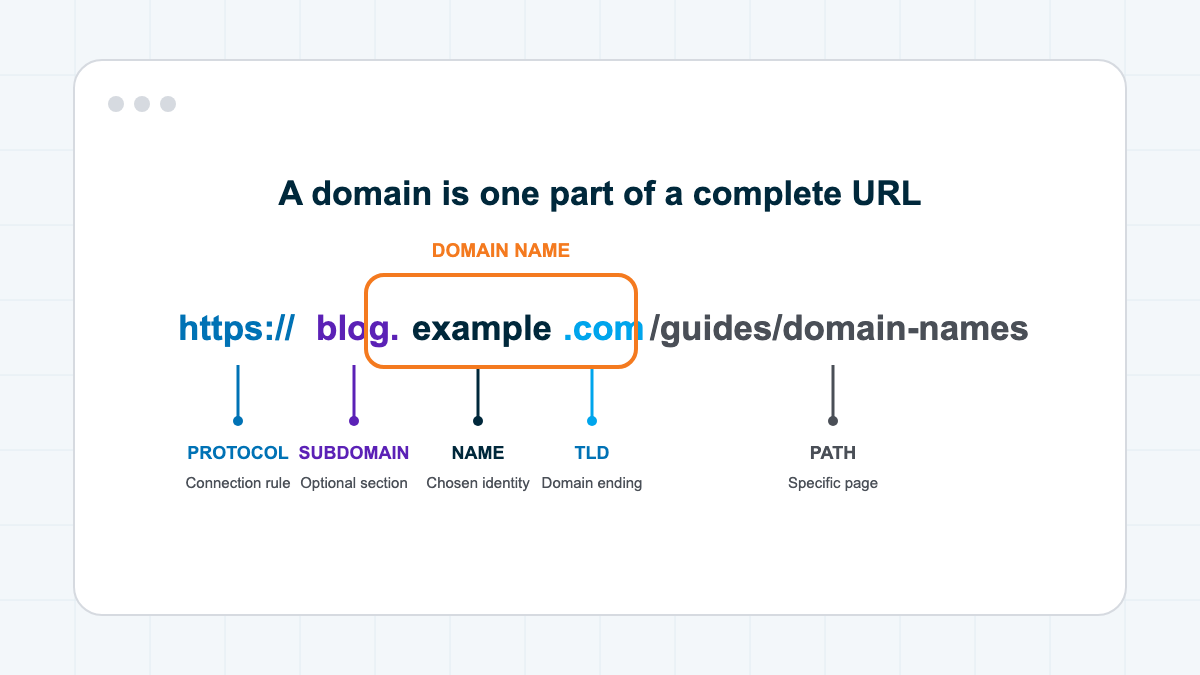
You may also see www before a domain. It is a subdomain, not a required part of the registered name. A site can be configured to show or hide it, but both versions should lead visitors to one preferred version.
How domain names work
When someone enters your domain, the browser needs to find the service connected to it. The Domain Name System, or DNS, handles that routing.
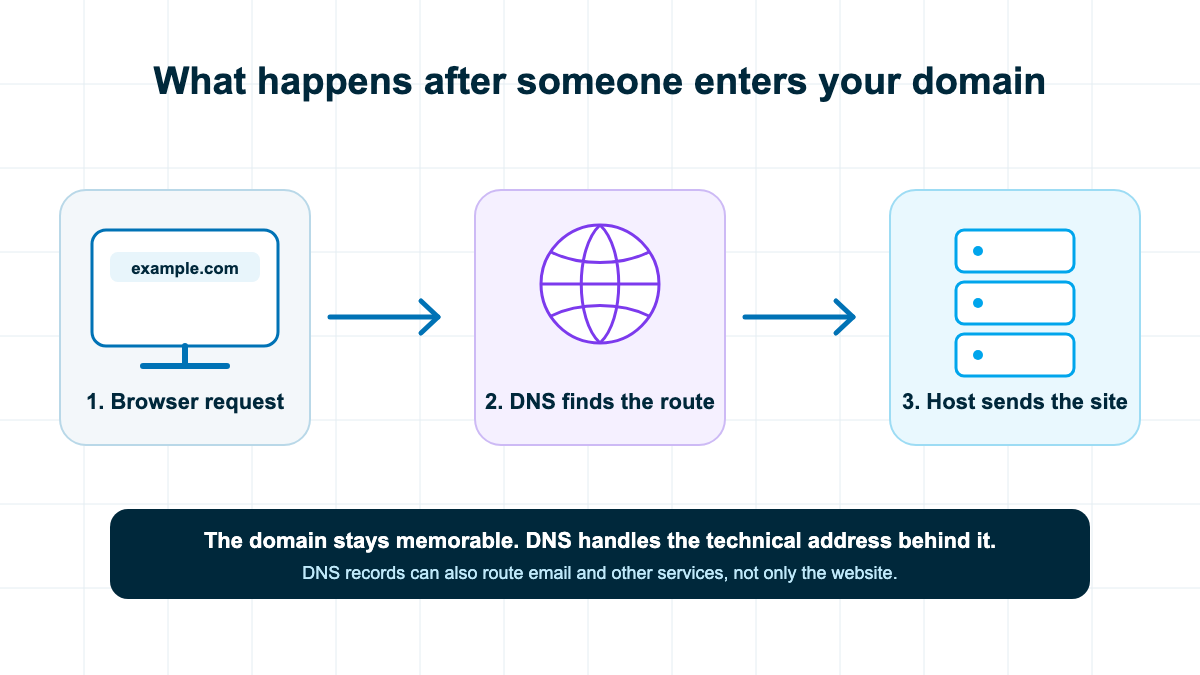
1. The browser asks where the domain goes
The browser or device first checks whether it already knows the answer. If not, it asks a DNS resolver to look it up. Caching this answer helps repeat visits move faster.
2. DNS finds the authoritative answer
DNS works through a hierarchy. The resolver follows the domain ending and the domain’s authoritative nameservers until it finds the record that tells it where the requested service should go.
3. The browser connects to the host
Once the browser has the route, it connects to the hosting server. The server sends back the page, images, styles, and scripts that make up the website. DNS can also direct email and other services, which is why changing records without understanding them can break more than the homepage.
What you are registering
You register a domain through a registrar or one of its resellers. The registrar records your right to use that name for a selected period and gives you controls for renewals, contact information, nameservers, DNS records, domain locks, and transfers.
People often say they “own” a domain. In practical terms, you control the registration while it remains active and follows the registration agreement. It is closer to a renewable right than a physical object you buy once forever.
Look past the first-year price. Check the normal renewal, privacy terms, transfer policy, and add-ons before checkout. Turn on auto-renew only after confirming the payment method and account email are ones you will keep.
Where should you get a domain?
The right answer depends on what you are doing next. I would use one of these two paths.
Only reserving the name: use a dedicated registrar
If the website is months away or you are protecting a project name, buy the domain through a dedicated registrar. Namecheap is our simple default, but pricing and features vary by extension. Our domain registrar comparison shows the current trade-offs before you choose.
Buying the domain separately
A dedicated registrar is best when you only need the name
Why it can be the cleaner setup
- Your address has a stable home You can change hosting companies without first moving the domain registration.
- Multiple domains stay together A dedicated registrar is easier to manage when you reserve several names or run more than one website.
- The renewal is easier to see Domain-only dashboards usually make registration dates, auto-renew settings, contacts, and transfer controls easy to find.
What you will handle yourself
- There is another account to protect You need a strong password, two-factor authentication, and a recovery email you will keep long term.
- You may need to connect DNS Your host or builder will give you the records or nameservers, but you are responsible for putting them in the right place.
- You may skip an included first-year domain Some longer-term hosting plans include the first domain registration, so buying it separately can add an unnecessary first-year cost.
Building now: choose the website platform first
If you are ready to publish, start with the tool that will run the site. A managed builder such as Wix or Squarespace can connect the domain during setup. For WordPress, choose a host first. Our hosting comparison recommends Hostinger for most first websites because the guided setup is beginner-friendly and eligible longer-term plans can include the first domain registration.
That route reduces the number of accounts and DNS steps on day one. It does not lock the address to the host forever. Keep control of the registrant account and you can transfer the domain or point it somewhere else later.
How to choose a good domain name
A good name is easy to say, easy to type, and broad enough to survive the next version of the project. It does not need to contain every keyword you hope to rank for.
- Say it out loud. If someone hears the name once, can they type it without an explanation?
- Keep spelling predictable. Avoid unnecessary numbers, hyphens, doubled letters, and clever spellings that create mistakes.
- Leave room to grow. A name tied to one city, product, or year may feel cramped when the business expands.
- Prefer a familiar extension. A clean .com is still an easy default when it is available, but a clear name on another suitable extension can beat a confusing .com.
- Check for conflicts. Search the web, social platforms, and relevant trademark databases before committing.
- Register it yourself. The owner’s account, payment method, recovery email, and contact information should stay under the owner’s control.
If you are choosing the domain as part of a new site, our complete website guide puts the name, platform, design, content, and launch steps in the right order. You can also compare the best website builders before committing to a platform.
Domain setup and security checklist
- Use an owner-controlled account. Do not leave the domain permanently inside a freelancer’s or agency’s personal account.
- Turn on two-factor authentication. The domain controls the public route to the site and may also control email.
- Use a long-term recovery email. A mailbox on the same domain can be a poor recovery option if the domain itself stops working.
- Confirm auto-renew and payment details. Calendar reminders are useful even when auto-renew is enabled.
- Enable the domain lock. Unlock it only when you intentionally start a transfer.
- Record the DNS setup. Save the current nameservers and important records before changing them.
- Use DNSSEC when the registrar and DNS provider support it. It helps protect DNS answers from being altered in transit.
Treat the domain account like the keys to the business. A strong password, two-factor authentication, a working recovery email, and renewal reminders matter more than saving a few dollars at checkout.
For the rest of the site, follow our website security checklist. Domain security and WordPress security protect different layers, so you need both.
Using a domain for professional email
The same domain can route email addresses such as hello@example.com. Email routing uses DNS records that are separate from the website route. That means your website and inbox can run through different providers while sharing one brand name.
Do not delete mail-related DNS records when moving the website. Copy the full DNS setup first, then recreate or preserve the records your email provider requires. Our guide to using Gmail with a custom domain walks through the email side.
Renewing, pointing, and transferring a domain
Renewing
Renewing extends the registration. The renewal price may differ from the introductory price, so check it before buying. Keep the payment method current and set a reminder well before expiration.
Pointing
Pointing changes where DNS sends visitors without moving the registration. This is the usual method when the domain stays at one registrar but the website moves to a new host or builder.
Transferring
Transferring moves the registration from one registrar to another. You typically confirm ownership, unlock the domain, request an authorization code, and approve the transfer. Some recent registrations, transfers, or contact changes can temporarily restrict another transfer, so start early rather than waiting until a renewal deadline.
Frequently Asked Questions
What is a domain name in simple terms?
A domain name is the memorable address used to reach a website, such as example.com. DNS connects that name to the hosting or service behind it.
Is a domain name the same as a website?
No. The domain is the address. The website is the collection of pages, images, and features people see after arriving.
Do I need hosting if I have a domain?
You need hosting or a hosted website builder to publish a working site. You can register a domain without hosting if you only want to reserve the name.
Can I buy a domain forever?
No. Domain registrations are renewed for set periods. You keep control by renewing on time and following the registration agreement.
What is the difference between a domain and a URL?
The domain is the core name, such as example.com. A URL is the complete address for a resource and can include the protocol, subdomain, path, query, and fragment.
Can I move my domain to another host?
Yes. You can point the existing domain to a new host by changing DNS, or transfer the registration to another registrar. Those are separate actions.
Can one domain be used for a website and email?
Yes. Separate DNS records can route the website and email to different providers while both use the same domain name.
Does the domain name affect SEO?
A clear, memorable domain can help people recognize and return to the brand, but stuffing keywords into the name is not a shortcut to rankings. Choose a name people can remember and build useful content on it.
The bottom line
A domain name is the public address, not the website. DNS routes that address, hosting runs the site, and URLs lead to individual resources inside it.
If you only want to protect a name, choose a dedicated registrar and keep the account under your control. If you are ready to build, choose the platform or host first and claim the domain during setup. Either way, protect the login, understand the renewal, and keep a copy of the DNS records. Those habits make the domain portable instead of fragile.
